Planhat
Connect Planhat to Floqer with an API access token from the organization's own Planhat private app.
Connect with a private app
Requirements:
- A Planhat user with the ServiceAccount permission, such as an admin. Without it, the Private app option does not appear in the App Center.
Create the app in Planhat
-
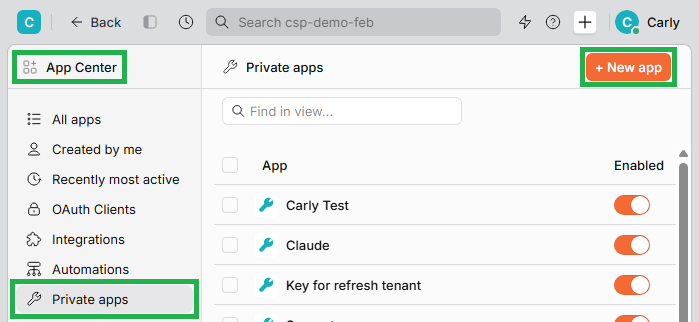
In Planhat, open App Center and click New app.
-
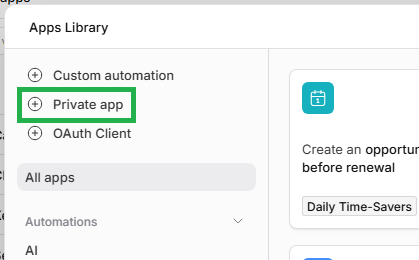
In the Apps Library, click Private app.
-
Name it
Floqer. Under Copy permissions from, keep Start from scratch and click Create.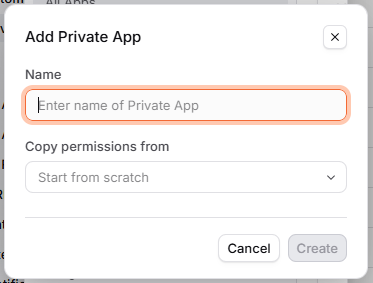
-
Open the Permissions tab and give the app at least View access to Companies. Floqer reads a company to check the connection, so it cannot connect without this.
-
For Floqer to read or update other Planhat data, such as end users, give the app View and Edit access to that data too. Permissions can be changed later.
-
Click Save.
-
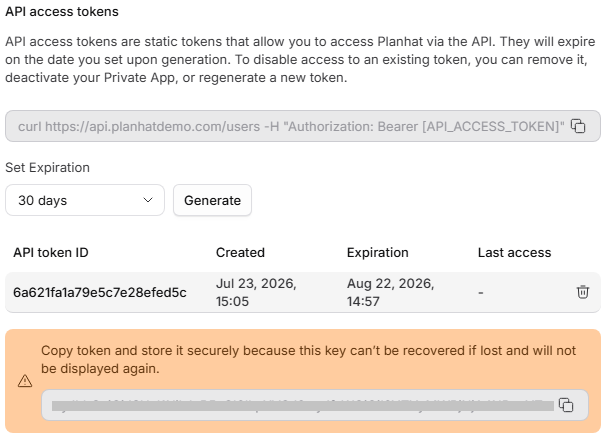
Open the Info tab, choose how long the token should last under Set Expiration, and click Generate new token.
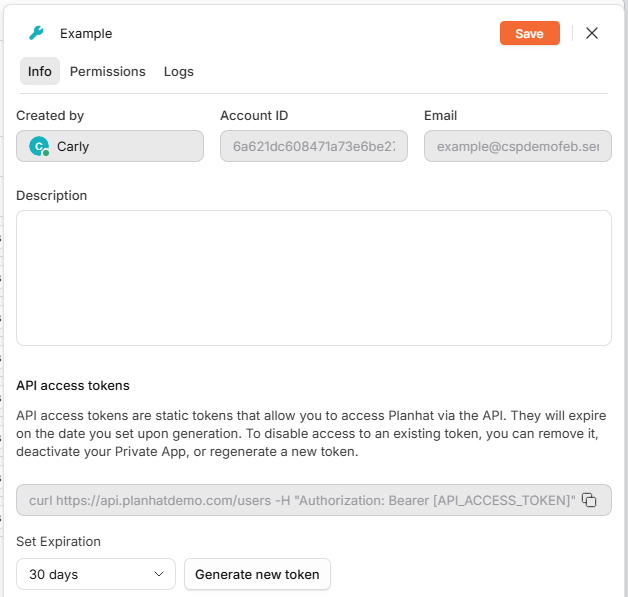
Note
The token stops working on the date chosen under Set Expiration, and workflows that use the connection fail from then on. To replace it, generate a new token on the app's Info tab.
-
Copy the token. Planhat shows it only once, so keep it somewhere safe until it is pasted into Floqer.
Connect in Floqer
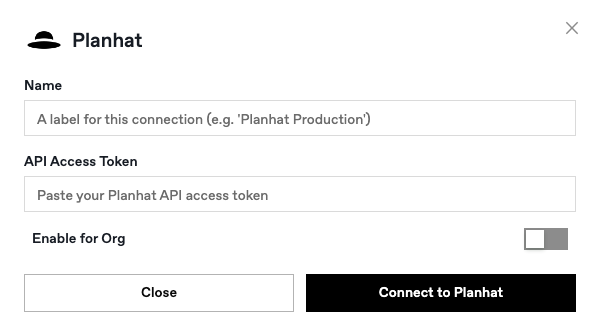
- Log in to app.floqer.com, go to Connections, and search for Planhat.
- Enter a Name for the connection, such as My Planhat key.
- Paste the token from step 8 above into API Access Token.
- Turn on Enable for Org if the connection should be available to the org.
- Click Connect to Planhat.
Troubleshooting
| Message | What to do |
|---|---|
| "Your Planhat private app needs View access" | The token works, but the app cannot view companies. Open the app's Permissions tab in Planhat, give View access to Companies, click Save, and connect again |
| "Reconnect your Planhat token" | The token is wrong, has expired, or was revoked. Generate a new token on the app's Info tab and connect again |
| "That token contains spaces or characters" | The pasted value has a space or other text inside it. Copy the token again from the app's Info tab |
| "Planhat didn't respond" | Floqer could not reach Planhat. Try again in a few minutes |
To cut access, delete the private app or its token in Planhat, or delete the connection in Floqer under Connections.
Have a question that isn't answered here? Contact Floqer support at hello@floqer.com.