CRM Data Enrichment: How to Automate It and Keep Every Record Accurate
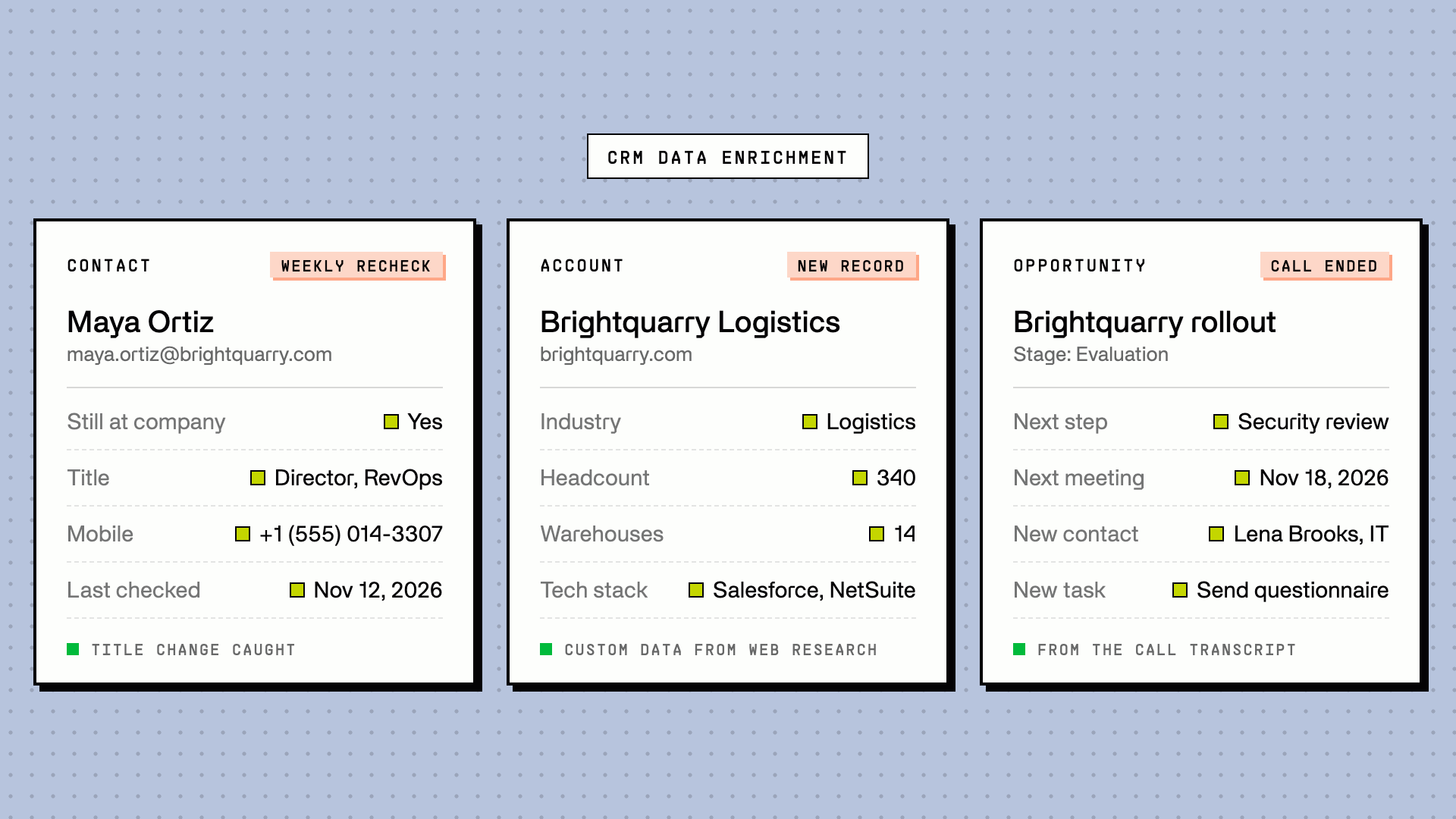
CRM data enrichment (often just called CRM enrichment) is the process of filling in and updating the records in your CRM (contacts, accounts, and opportunities) with data from outside sources and from your own sales conversations, so every record stays complete and current. Done well, it runs on its own: when a record is created, on a schedule, and whenever something changes, like a job change, a bounced email, or a finished sales call.
Last updated: November 12, 2026.
Disclosure: Floqer builds CRM enrichment workflows, and one clearly labeled section shows how we do it. Everything else in this guide applies whatever tool you use.
What is CRM data enrichment?
CRM data enrichment adds what a record is missing and corrects what has gone out of date. It is one part of CRM data hygiene, and it's often confused with three neighboring jobs. A healthy CRM needs all four:
| Job | What it does | Example | How often |
|---|---|---|---|
| Enrichment | Adds missing data and updates stale data from outside sources | Adds a mobile number, current title, and company headcount to a contact | On entry, then on a schedule and on events |
| Cleansing | Fixes data that is wrong or inconsistent | Standardizes "VP Sales", "VP, Sales" and "Vice President of Sales" | Continuously, as data arrives |
| Deduplication | Finds and merges records that are the same person or company | Merges three records for one contact created by a form, an import, and a sales tool | Before every create, plus a periodic sweep |
| Appending | Matches a list against a data source once to add fields | Adds firmographics to a purchased event list before import | One-off |
Enrichment covers six kinds of data:
- Contact data (contact enrichment): work email, mobile and direct dial, job title, seniority, department, LinkedIn URL, location.
- Firmographic data (company or account enrichment): industry, headcount, revenue, headquarters, funding, parent company.
- Technographic data: the tools and platforms a company uses.
- Signals: website visits, hiring, funding rounds, job changes, news.
- Custom data: facts specific to your market that no database sells, like how many assembly facilities a manufacturer runs, how many sites a school district has, or whether a company won a grant. AI web research agents find these by reading company websites, filings, and news.
- First-party conversation data: what was said on calls, in emails, and in meetings, such as next steps, competitors, budget, and timeline. Most enrichment guides stop at third-party data, but for opportunities, first-party data enrichment is often what matters most.
CRM enrichment vs. lead enrichment: lead enrichment fills in a new lead when it arrives. CRM enrichment covers every record for as long as it lives in your CRM, which is where most data quality problems actually start.
How to enrich CRM data in 7 steps
The rest of this guide covers each step in detail.
- Audit what's missing and what's stale. Check fill rates on the fields your team uses, your bounce rate, and when each record was last checked.
- Pick the fields a decision depends on. Enrich what routing, scoring, reports, or reps actually use (what to enrich).
- Choose your sources: your CRM's built-in enrichment, a single provider, a waterfall, or a workflow platform (the four options compared).
- Set a write rule for every field, so enrichment never overwrites good data or creates duplicates (write rules).
- Turn on triggers: new records, job changes, bounced emails, finished sales calls, and stage changes (triggers).
- Test on 3 to 5 records, check every field the workflow wrote, then widen to a sample before the whole CRM.
- Recheck on a schedule and measure fill rates, bounces, and cost per usable record (how to measure).
Why CRM data goes bad: the causes of CRM data decay
CRM data doesn't fail all at once. It drifts, record by record, for five reasons.
1. People change jobs. Across Floqer implementations, on CRMs ranging from under 5,000 contacts to over half a million, about 20% of contacts have changed roles by the time we first check them, and 5 to 10% have left their company entirely. After that, expect 2.5 to 5% of contacts to change roles every month. In a 20,000-contact CRM, that's 500 to 1,000 people a month whose title, company, or email no longer matches what your CRM says.
2. Duplicates keep coming back. Forms, imports, sales tools, and AI notetakers all create records, often with exact-match logic that misses "Acme Inc." vs. "Acme". In the 2025 State of RevOps survey by Openprise, RevOps Co-op, and MarketingOps, 75% of teams reported duplicate records. One-off merges don't hold: HubSpot admins describe clearing 2,000 duplicates and finding 2,000 more a month later.
3. Emails bounce. A hard bounce usually means the person has left, but most sequencers only log the bounce as an activity. The contact keeps its dead email, and the next campaign bounces again.
4. Reps don't log what they learn. The most valuable data on an opportunity (next steps, competitors, budget, decision process) comes from calls. Reps skip logging it, so those fields stay blank.
5. Cleanup projects rot. A one-time cleanup leaves the CRM accurate for a few weeks. Without automation, decay and duplicates return, and so does the next cleanup project. In Validity's State of CRM Data Management in 2025 report, a survey of 602 CRM users and administrators in the US, UK, and Australia, 76% said less than half of their CRM data is accurate and complete, and 37% said poor data quality had cost them revenue.
Where the usual decay numbers come from. Many enrichment guides say B2B data decays 22.5% or "about 30%" a year. The 22.5% is a 2.1%-per-month figure attributed to MarketingSherpa, and the original study isn't public. The 30% figure blends a data vendor's separate decay rates for phone numbers, emails, and addresses. The job-change numbers above come from Floqer's own implementations, measured on real CRMs.
CRM data enrichment tools: 4 ways to enrich your CRM
There are four ways to enrich a CRM, and most teams move through them in order as their data needs grow.
- Your CRM's built-in enrichment. HubSpot includes data enrichment on its paid plans, at no extra cost. It fills basic contact and company fields from one source, and only enriches contacts with a business email. Zoho CRM's Zia offers built-in enrichment for leads, contacts, and accounts on its paid editions. Salesforce doesn't include a third-party enrichment database, so Salesforce teams add one.
- A single data provider. ZoomInfo, Apollo, Cognism, or Lusha syncs its database into your CRM. Coverage is whatever that one database holds, which varies a lot by region, company size, and industry.
- A waterfall across providers. A waterfall tries several providers in order until one finds the data, and you pay only for results. For work emails, that typically finds 20 to 30% more than any single provider. Our guide on building an email enrichment waterfall shows how.
- A workflow platform. Waterfalls, AI research, signals, and write-back rules run as automated workflows on your CRM. Enrichment fires on the events that matter, and you control exactly what gets written where.
| Built-in CRM enrichment | Single provider | Waterfall | Workflow platform | |
|---|---|---|---|---|
| Coverage | Basic fields, one source | One database | Highest for emails and phones | Waterfall plus AI research and conversation data |
| Freshness | Continuous, for fields nobody edited | The provider's refresh cycle | Live lookup on each run | Live lookups, on schedules and events |
| Control over writes | A few settings | The provider's sync settings | Order and rules per field | Per-field rules, approvals, any object |
| Cost model | Included in the plan | Annual contract, often per seat | Pay per result | Usage-based credits |
| Best for | Basics on HubSpot | Teams one vendor covers well | Contact data at scale | Enrichment that runs itself across the whole CRM |
If your CRM only needs job titles and company sizes, built-in enrichment may be enough. Once you need phone numbers, coverage outside the US, custom fields, or enrichment that reacts to events, you need a waterfall or a workflow platform.
How to choose a CRM enrichment tool
Whichever approach you pick, check these seven things before you sign:
- Coverage on your own records. Run a sample of your CRM through a trial. Coverage varies by region, company size, and industry, so a vendor's average match rate tells you little.
- Paying per result or per lookup. If you pay only when data comes back, a miss costs nothing.
- Write rules for each field. You should decide, field by field, whether enrichment fills blanks, overwrites, or asks first.
- Event triggers. Look for enrichment that runs on new records, job changes, and bounces, not only on a schedule.
- Which records it can write. Contacts and companies are standard. Check opportunities, tasks, and custom objects if your team works them.
- A duplicate check before every create. The tool should match on email, LinkedIn URL, and domain before it creates a record.
- No paying twice. A rerun on unchanged inputs should reuse earlier results instead of buying the same data again.
What to enrich: contacts, accounts, opportunities, and custom objects
Enrich the fields a decision depends on, not every field you could fill. If no routing rule, score, report, or rep uses a field, filling it costs money and adds nothing.
| Record | Fields worth enriching | What it powers |
|---|---|---|
| Contacts | Work email, mobile, title, seniority, LinkedIn URL, still-at-company status | Outreach, routing, personalization, job-change plays |
| Accounts | Industry, headcount, revenue, location, tech stack, funding, parent company | ICP scoring, territories, segmentation, marketing automation |
| Account custom data | Your market's specifics: facilities, sites, certifications, grants, hiring for a role | Scoring that reflects how your best customers actually look |
| Opportunities | Next steps, competitors, budget, timeline, decision process, buying committee | Forecasting, deal reviews, MEDDIC and other qualification frameworks |
| Custom objects | Whatever your team works: locations, partner records, renewals, custom deal types | The workflows your CRM was customized for |
| Tasks and activities | Follow-ups agreed on calls, owners, due dates | Nothing promised on a call slips |
Lumana, an AI video security company, shows what account custom data looks like in practice. Floqer adds camera counts, number of sites, existing security infrastructure, incident history, and grant awards to every account in its Salesforce, next to verified contact details for each buying-committee member (case study).
When to enrich: the triggers that keep a CRM current
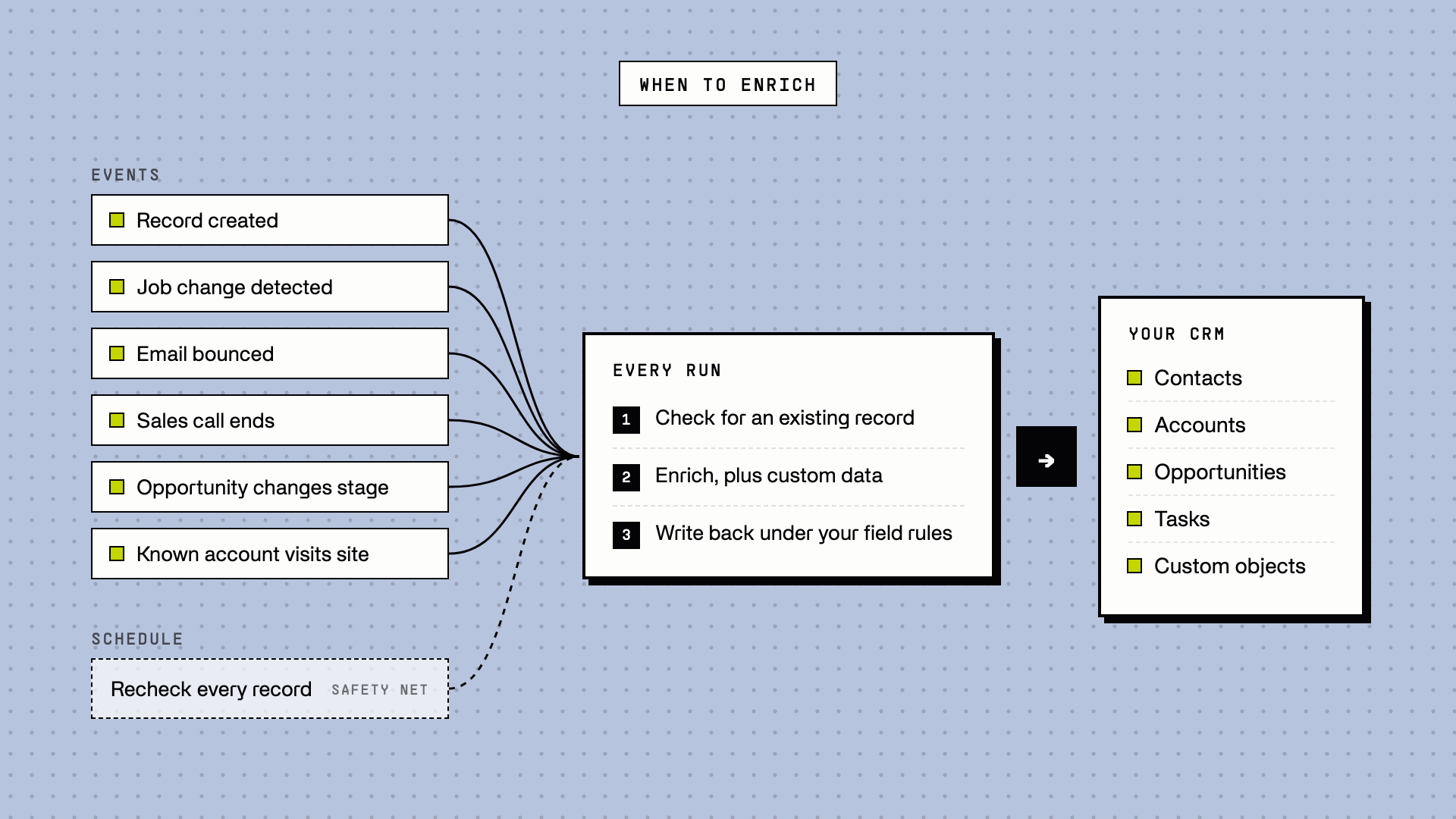
Enriching on a fixed schedule alone is how CRMs go stale between runs. The CRMs that stay accurate enrich in real time, on events, and use batch rechecks on a schedule as the safety net.
| Trigger | What runs | Why it matters |
|---|---|---|
| A record is created (form fill, import, integration) | Check for an existing record, then enrich, then route | Every record arrives complete, and no duplicates get created |
| A scheduled recheck | Confirm each person is still at the company, check titles, fill missing fields | Catches the 2.5 to 5% of contacts who change roles each month |
| A job change is detected | Mark the old contact as moved on, find the person at their new company | The old account stays accurate, and a past champion becomes a new lead |
| An email bounces | Find and verify a new email, or flag the old one | The next campaign doesn't bounce again |
| A sales call ends | Pull next steps, competitors, and dates from the transcript | Opportunity fields fill themselves, and follow-ups become tasks |
| An opportunity is created or changes stage | Research the account, map the buying committee | Reps start every deal with the full picture |
| A known account visits your website | Refresh the account, alert the owner | Sales acts while the interest is fresh |
How often to recheck depends on the record. Contacts on open opportunities and target accounts deserve a monthly recheck, because a champion who leaves mid-deal can sink it. The rest of the CRM can run quarterly. Totango runs this kind of system on Salesforce, watching for title changes and champion moves alongside website visits and hiring signals, and keeps its CRM 100% relevant and up to date (case study).
For HubSpot, our guide on automating HubSpot data enrichment walks through the create, form-fill, and website-visit triggers step by step.
Beyond the contact record: enrich opportunities, tasks, and custom objects
Most CRM enrichment stops at contacts and companies. The records your revenue actually runs on, opportunities, tasks, and the custom objects your CRM was built around, are where the biggest gaps sit. Three workflows close them.
Update opportunities and create tasks from sales calls
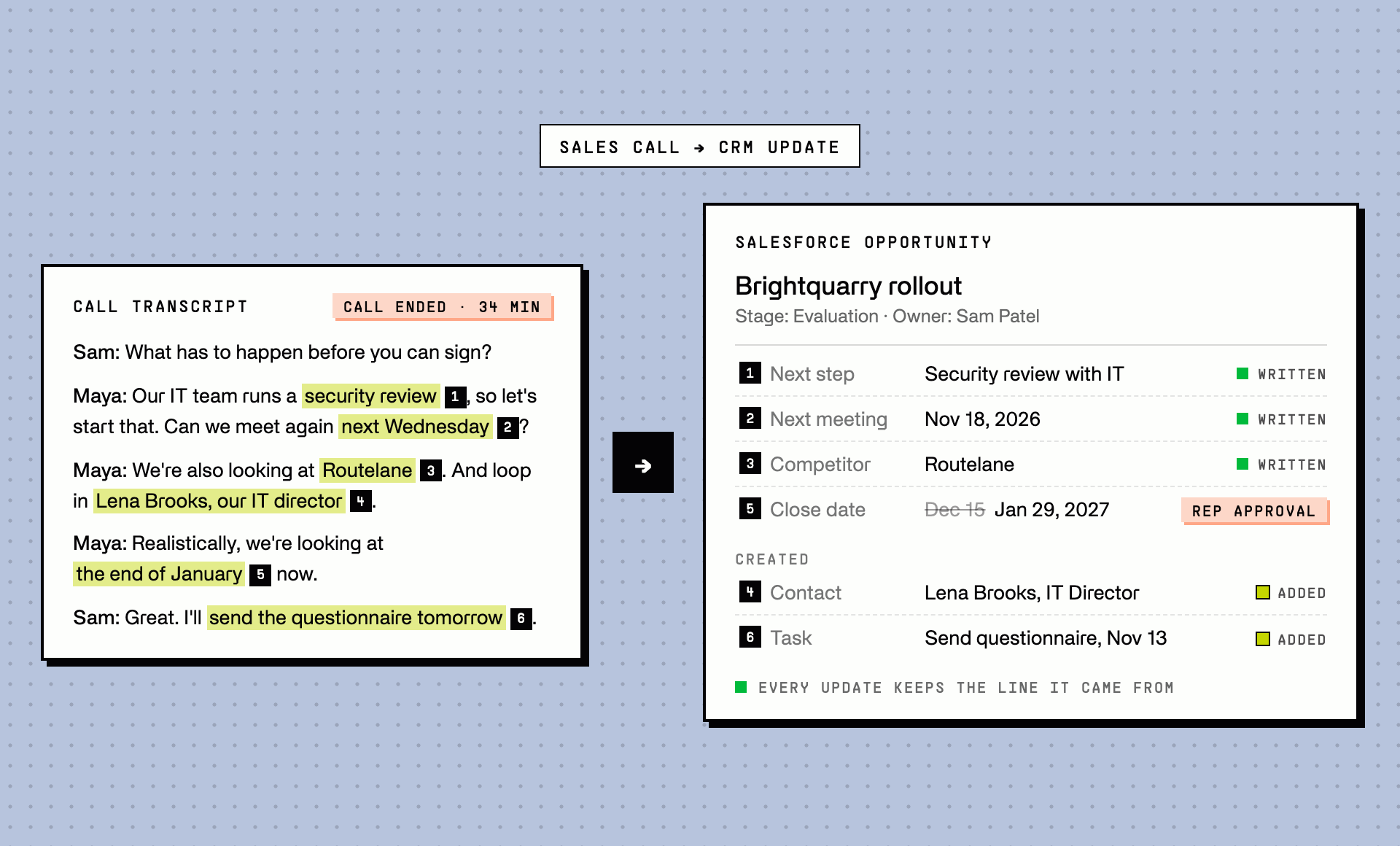
Every sales call produces data your CRM needs: the next step, the next meeting date, the competitors mentioned, the budget, who else is involved. Reps rarely log it. So opportunity fields stay blank, forecasts run on guesswork, and follow-ups promised on the call slip.
The fix is to treat every finished call as an enrichment trigger:
- The call ends. Your recording tool (Gong, Fireflies, Zoom, or similar) sends the finished call to a workflow, by webhook or a scheduled pull of new calls.
- AI reads the transcript and extracts only the fields you define: next step, next meeting date, competitors, budget, decision process, and any new stakeholders mentioned.
- The workflow suggests or writes updates to the opportunity and its account. Fields you trust, like next step, write straight through. Sensitive ones, like amount or close date, go to the rep for approval first, for example as a Slack message with approve and edit buttons.
- Follow-ups become tasks. Each agreed action becomes a CRM task with an owner and a due date.
- New people become contacts. A stakeholder named on the call gets looked up, enriched, and added to the opportunity, after a check that they aren't already in the CRM.
One Floqer customer assumed this would take an engineering project. Now every completed call recording produces suggested Salesforce updates and follow-up tasks on its own.
Built-in options exist, each with limits. Gong's AI Data Extractor writes what it hears on Gong calls into existing deal fields, but doesn't create records. HubSpot's deal progression, in beta, suggests deal property updates from logged calls, meetings, and emails on Sales Hub or Service Hub Professional and up. Salesforce's Agentforce can suggest or make opportunity updates like next step and stage, with an Agentforce add-on. A workflow works across recording tools, creates tasks and contacts as well as updating fields, and lets you decide which fields need a human check.
Two rules keep AI-extracted fields trustworthy. Extract only what was actually said, and keep the supporting line from the transcript next to the update so the rep can see where it came from. And watch for hedges: "we might look at this next quarter" is not a commitment, so it shouldn't become a close date.
Fix bounced emails automatically
A hard bounce is a free job-change signal. When a contact's email bounces, the person has usually left, or their company has changed domains. Most sequencers log the bounce as an activity and stop there, so the dead email stays in the CRM and bounces again in the next campaign.
Close the loop instead:
- Your sequencer sends the bounce (Smartlead, Instantly, lemlist, Outreach, or similar) to a workflow by webhook.
- Check whether the person is still at the company. If they've moved on, mark the contact accordingly, then find them at their new company and add them there as a new lead.
- If they're still there, find a new email with a verified email waterfall, and update the contact. Keep the old address in a separate field, so you have a record of what changed.
- If no valid email turns up, flag the contact and pull it from future sends, rather than leaving a dead address in place.
Skip catch-all addresses in step 3. A catch-all domain accepts mail for any address, so it can't confirm the new email is real.
Enrich custom objects and opportunities with contacts attached
Enrichment doesn't have to stop at standard records. If your CRM runs on custom objects, such as locations, partner records, or custom deal types, a workflow can create, update, and enrich those records the same way it handles contacts. In Salesforce, that means any object, including custom objects, with upserts matched on an external ID so a rerun updates the same record instead of creating a new one.
One Floqer customer builds custom opportunities for its sales team: when research qualifies an account, a workflow creates the opportunity, attaches the right people as contacts, and hands it to the sales team to work. The reps start with a complete deal record instead of a company name.
AI CRM enrichment: what AI does well and where it needs a check
Data providers sell the fields every company has. AI fills in the rest, and it does three jobs well:
- Research custom data on the live web. AI research agents read company websites, filings, job posts, and news to answer questions no database covers, like how many warehouses a company runs or whether it's hiring for a role you sell to.
- Extract fields from conversations. AI reads call transcripts and emails and pulls out next steps, competitors, budgets, and dates, as in the sales call workflow above.
- Standardize messy values. AI maps free-text job titles to seniority levels and provider industries to your own picklist, so enriched values pass validation and segment cleanly.
AI also makes a mistake a database lookup doesn't: it can state a guess as a fact. Three checks keep AI-written fields trustworthy:
- Keep the source. Store the URL or transcript line next to every AI-written value, so anyone can verify it.
- Allow "unknown". An AI field should return nothing rather than guess. A blank is easy to fill later, while a confident wrong value spreads into scoring and routing.
- Review what matters. Send high-impact fields, like close date, amount, or owner, to a person for approval before they're written.
CRM data enrichment best practices: write rules that protect your data
Automated enrichment can damage a CRM faster than any rep. The sharpest complaints about enrichment tools are about overwrites: contacts in Michigan moved to Georgia because their company is based in Atlanta, or names swapped and hard to restore. Decide how each field gets written before you turn anything on.
| Write rule | Use it for | Examples |
|---|---|---|
| Fill only if empty | Fields a rep may have entered by hand | Phone, title on contacts reps work daily |
| Overwrite when newer and verified | Fields that go stale and that reps rarely touch | Headcount, industry, still-at-company status, an email confirmed after a bounce |
| Never overwrite | Fields owned by people or other systems | Owner, lead source, notes, deal amount |
| Send for review | Changes with big consequences | Account owner, opportunity stage, close date |
Four more rules make the difference between enrichment you trust and enrichment you reverse:
- Check before you create. Match every new record against the CRM on email, LinkedIn URL, and company domain before creating it, because exact name matching misses "Acme Inc." vs. "Acme".
- Never write blanks. An empty result means the lookup found nothing, not that the field should be empty. It must never erase an existing value.
- Record where data came from. Add fields for the enrichment source, the date a record was last checked, and the result (still there, moved on, title changed, couldn't check). When someone questions a value, the answer is on the record.
- Test small first. Run a new workflow on 3 to 5 records, check every field it wrote, then widen to a sample before the whole CRM.
Salesforce data enrichment: what to get right
Salesforce doesn't include a third-party enrichment database. Its Data Cloud "enrichments" copy data you already hold in Data Cloud onto CRM records, rather than adding outside data, so Salesforce teams enrich through a data provider or a workflow platform.
Whether you enrich Salesforce leads, contacts, or accounts, Salesforce gives you more control than most CRMs, and more ways for an enrichment workflow to fail quietly. Check these six things before you run one at scale. Our Salesforce integration page covers the connection itself.
- The integration user's permissions. Enrichment writes as the Salesforce user you connect, and field-level security applies to every write. Use a dedicated integration user with edit access to exactly the fields enrichment is allowed to touch.
- Duplicate and matching rules. A duplicate rule set to block can reject an enrichment write. Decide in advance whether enrichment should respect those rules or push through specific updates you know are correct.
- Validation rules and picklists. Enriched values must pass your validation rules and match your picklist values. Map provider values like "Computer Software" to your own industry picklist before writing.
- Assignment rules. Writing to a lead or account can trigger assignment rules and quietly change the owner. Keep them off for enrichment writes unless reassignment is the point.
- Lead conversion. Enriched fields on a lead only carry over to the contact, account, and opportunity when you convert it if they're mapped in Salesforce's lead field mapping. Even then, a mapped value won't replace one already on an existing account or contact. Map your enriched fields, or enrich the converted records directly.
- API limits. Your org has a rolling 24-hour API request limit that depends on your edition and licenses. A full recheck of a large CRM uses a lot of it, so schedule big runs outside working hours and watch usage.
Salesforce enrichment also works best when it can reach every object you use, including custom objects. Pull records on a schedule, enrich them, and write back with upserts matched on an external ID, so a rerun updates the record it touched before.
HubSpot data enrichment: the short version
HubSpot's built-in data enrichment is included on paid plans, from Starter up, without using HubSpot credits. It fills basic contact and company fields, needs a business email to enrich a contact, doesn't return contact phone numbers, and stops updating a property once a user or another system edits it. For many HubSpot teams it covers the basics, and a workflow adds phone numbers, custom data, and enrichment on events.
Our guide on HubSpot data enrichment covers how to automate it at the three moments that matter, and our HubSpot integration page covers the connection.
What CRM data enrichment costs
Credits aren't a common unit. Every vendor defines what a credit buys, and some charge for every lookup while others charge only when data comes back. Compare tools on one number instead: cost per usable record, meaning total spend divided by the records that gained a field someone actually uses.
Four things drive that number:
- Paying per result vs. per attempt. A waterfall that charges only when a provider returns data costs nothing on a miss. A tool that charges per lookup bills you for every empty answer.
- Which fields you enrich. Phone numbers typically cost several times more than emails. Enrich phones only for contacts your team will actually call.
- How often you recheck. Rechecking 20,000 contacts monthly costs three times as much as quarterly. Recheck open opportunities and target accounts monthly, and the rest quarterly.
- Paying twice for the same answer. A rerun on unchanged inputs shouldn't cost anything. Look for tools that reuse earlier results instead of buying the same data again.
The cheapest record is one you don't enrich. If no score, route, report, or rep uses a field, leave it empty.
How to measure CRM data quality after enrichment
Enrichment is working if these five numbers move the right way. Check them monthly, on a dashboard your team already looks at:
- Fill rate on the fields that matter: the share of records with a value in each field your routing, scoring, and reps use. Ignore fields nobody uses.
- Bounce rate: it falls when emails get verified before they're written and bounces get fixed.
- Share of records checked in the last 90 days: the clearest sign your rechecks are running. Read it from your last-checked field.
- Duplicates created per month: this should trend toward zero once every create starts with a check.
- Cost per usable record: total spend divided by the records that gained a field someone uses.
If fill rates rise but bounces don't fall, enrichment is adding data without verifying it.
How to automate CRM data enrichment with Floqer
This is the one section about our product. Floqer's CRM enrichment connects to your CRM and runs every workflow in this guide on its own, with the write rules above built in. Most teams start with two workflows and add the rest as they go.
- Enrich every new record. Floqer checks your CRM for new records every few minutes. For each one it checks for an existing match first, so it never creates a duplicate, then runs waterfalls across 100+ data sources, adds custom data from AI web research, and writes back under your field rules. Optionally it routes the record and pings the owner in Slack.
- Recheck the CRM on a schedule. Weekly is typical. Floqer confirms each person is still at their company, catches title changes, fills missing fields, and writes the last-checked date and the result onto every record.
- Turn calls into CRM updates. Each finished call becomes suggested opportunity updates, new contacts, and follow-up tasks, with the fields you choose sent to the rep in Slack for approval.
- Fix bounces. Each bounce from your sequencer triggers a still-at-company check, then a new verified email, a moved-on flag, or a new lead at the person's next company.
Floqer's Salesforce writes skip empty values by default, leave assignment rules off unless you turn them on, and work on any object, including custom objects. With waterfall enrichment, Floqer finds an email for 95% or more of contacts.
Teams already run it this way:
- Perplexity cleaned and enriched more than 10 million records, then routed and scored them in Salesforce without manual cleanup or duplicates (case study).
- Structured automated lead research, enrichment, scoring, and routing, and processes inbound leads 80% faster (case study).
- Azumuta raised its HubSpot enrichment coverage from 16% to over 66% of contacts (case study).
To try it on your own CRM, sign up for free and connect Salesforce or HubSpot.
FAQ
What is CRM data enrichment? CRM data enrichment is the process of filling in and updating the records in your CRM with data from outside sources and from your own sales conversations. It covers contacts, accounts, and opportunities, and works best when it runs automatically on new records, on a schedule, and on events like job changes and bounced emails.
What is the difference between CRM enrichment and data enrichment? Data enrichment is the general term for adding outside data to any dataset, from a lead list to a product catalog. CRM enrichment applies it to the records in your CRM database, and keeps going for as long as each record lives there, with rules for what gets written.
What is the difference between CRM enrichment and data cleansing? Enrichment adds missing data and updates stale data from outside sources. Cleansing fixes data that is wrong or inconsistent, like standardizing job titles or country names. A healthy CRM needs both, plus deduplication.
How often should CRM data be enriched? Enrich every record when it's created, then recheck on a schedule and on events. Across Floqer implementations, 2.5 to 5% of contacts change roles every month, so recheck contacts on open opportunities and target accounts monthly, and the rest of the CRM quarterly.
Can you enrich records already in your CRM? Yes. Run a backfill in batches: start with a sample to check what comes back, enrich only the fields that matter, and schedule large runs outside working hours so they don't use up your CRM's API limits. After the backfill, triggers and scheduled rechecks keep those records current.
Can CRM data enrichment run automatically? Yes. Enrichment can run when a record is created, when a form is filled, on a recurring schedule, and on events such as a job change, a bounced email, a finished sales call, or an opportunity changing stage. Automated enrichment is the only kind that keeps a CRM current, because one-off cleanups start decaying the day they finish.
Can AI enrich CRM data automatically? Yes. AI research agents can fill custom fields from the live web, AI can extract next steps and competitors from call transcripts, and AI can standardize job titles and industries to your picklists, all on triggers. Keep the source next to every AI-written value, let fields return "unknown" instead of guessing, and send high-impact fields for approval.
Will enrichment overwrite data my reps entered? Only if you let it. Set a write rule for each field: fill only if empty for fields reps enter, overwrite only with newer, verified data for fields that go stale, never for fields people own, and send for review for high-impact changes. An empty enrichment result should never erase an existing value.
Will CRM enrichment create duplicates? It can, if the tool creates records without checking first. Match every new record against the CRM on email, LinkedIn URL, and company domain before creating it. Floqer runs this check before every create.
How accurate is CRM data enrichment? It depends on the source and the field. Work emails can be verified before you write them, phone numbers are harder to confirm, and job titles change with every promotion. AI-researched fields are only as good as their sources, so keep the source with each one. Measure your own accuracy with bounce rates and still-at-company checks, rather than trusting a vendor's average.
Can enrichment update opportunities and create tasks? Yes. A workflow can update opportunity fields, add buying-committee contacts, and create follow-up tasks with owners and due dates. The most useful source for this is your own sales calls, which hold the next steps, competitors, and timelines reps don't log.
How do you enrich a CRM from call recordings? Send each finished call from your recording tool to a workflow, have AI extract the fields you define from the transcript, and write them to the opportunity. Route sensitive fields like amount and close date to the rep for approval, and turn agreed follow-ups into CRM tasks.
Can you enrich custom objects? Yes, with a tool that can write to them. In Salesforce, a workflow can create, update, and upsert any object, including custom objects, matched on an external ID so reruns update the same record.
What should happen when an email bounces? Treat it as a job-change signal. Check whether the person is still at the company. If they've left, mark the contact as moved on and find them at their new company. If they're still there, find and verify a new email, and if none turns up, flag the contact and remove it from future sends.
What are the best CRM data enrichment tools? It depends on what your CRM needs. Built-in enrichment in HubSpot and Zoho CRM covers basic fields. Data providers like ZoomInfo, Apollo, Cognism, and Lusha sync one database into your CRM. Workflow platforms like Floqer and Clay run waterfalls across many providers, with AI research and write rules on top. Agencies also sell CRM data enrichment services if you'd rather not run it yourself. Our Clay alternatives guide compares the workflow platforms.
How much does CRM data enrichment cost? It depends on the fields you enrich, how often you recheck, and whether you pay per result or per lookup. Compare tools on cost per usable record, not on credits, since every vendor defines a credit differently. Floqer has a free plan with 100 credits and paid plans from $49 a month.
Is HubSpot's built-in enrichment enough? For basic contact and company fields, often yes. It doesn't return contact phone numbers, needs a business email to enrich a contact, and doesn't run custom research or react to events like bounces and job changes, so most teams add a workflow for those.
Does Salesforce have built-in data enrichment? Salesforce doesn't include a third-party enrichment database. Its Data Cloud enrichments copy data you already hold in Data Cloud onto CRM records, rather than adding outside data. Salesforce teams add enrichment through a data provider or a workflow platform that reads and writes Salesforce records, including custom objects.
What happens to enriched fields when a Salesforce lead converts? Custom lead fields only carry over to the contact, account, and opportunity if they're mapped in Salesforce's lead field mapping, and a mapped value won't replace one already on an existing account or contact. Map every enriched field before converting, or enrich the converted records directly.
See it running on your own CRM. Get a demo.