Waterfall Enrichment: What It Is, How It Works, Tools and Costs
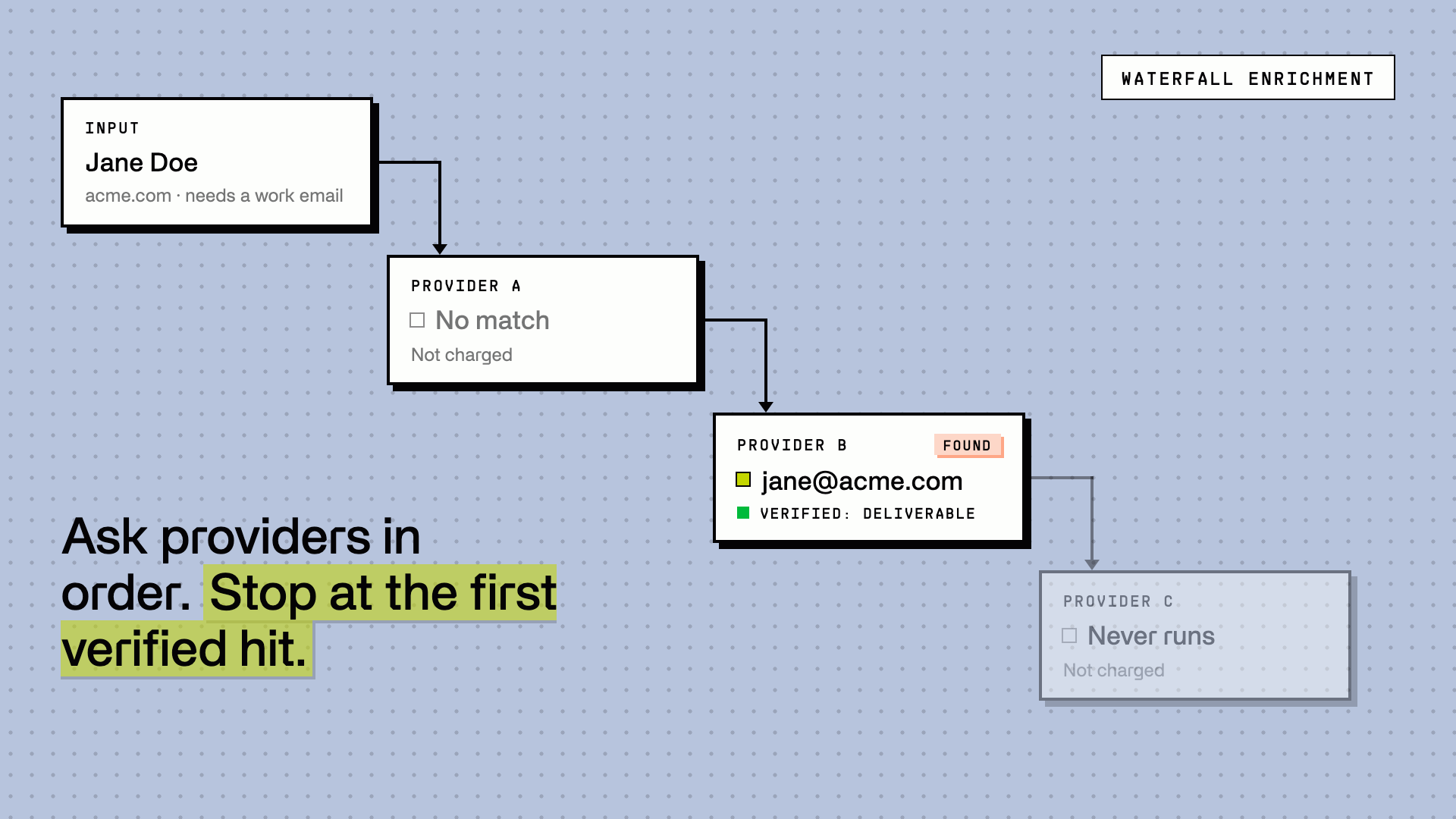
Waterfall enrichment is a way to fill in missing B2B data, such as a work email or mobile number, by querying several data providers in sequence. If the first provider has no result, the next one tries, and the sequence stops at the first result that passes verification.
You get the combined coverage of every provider in the chain, and with most tools you pay only when a provider actually returns something.
Last updated: November 19, 2026.
Disclosure: Floqer runs waterfall enrichment, so we have a stake in this topic. The guide explains the method in general terms, and one clearly labeled section shows how Floqer does it.
In this guide
- What is waterfall enrichment?
- How waterfall enrichment works, step by step
- What data you can enrich with a waterfall
- Why a waterfall finds more than one provider, and where it stops helping
- What waterfall enrichment costs
- Waterfall enrichment in Apollo, Clay and ZoomInfo
- Waterfall enrichment tools compared: four types
- Where Floqer fits
- Waterfall enrichment API and MCP
- How to set up your first waterfall
- FAQ
What is waterfall enrichment?
Waterfall enrichment runs a list of data providers in a fixed order for each record. It's also called an enrichment waterfall, a data waterfall, or waterfall data enrichment. The name comes from the way a record cascades down the list: it only drops to the next provider when the one above it comes up empty.
Waterfall enrichment in sales mostly means finding contact details: work emails, mobile numbers, personal emails, and LinkedIn profiles. They run on outbound lists before a campaign, on inbound leads as they arrive, and on CRM records that have gone stale.
A simple example. You need the work email for Jane Doe at acme.com:
- Provider A has no record of her. Nothing is returned, and with most tools nothing is charged.
- Provider B returns jane@acme.com.
- A verifier checks the address and says it's deliverable.
- The waterfall stops. Providers C and D never run, so you never pay them.
The point is coverage. Every provider's database has gaps, and the gaps are different. A waterfall lets the second, third, and fourth providers fill the holes the first one leaves.
How waterfall enrichment works, step by step
1. Start from the identifiers you have
Every provider needs something to search with. For people, that's usually a full name plus a company domain, or a LinkedIn profile URL. For companies, it's a domain.
The inputs decide which providers can run at all. In Floqer's email waterfall, for example, Hunter, LeadMagic and Datagma search by name and domain only, Wiza searches by LinkedIn URL only, and Prospeo and Apollo can use either. If you only have a LinkedIn URL, the name-and-domain providers are skipped. Passing both kinds of identifier gives every provider a chance.
Input quality matters more than it looks. A waterfall given the wrong company domain can return a perfectly deliverable email at the wrong company.
2. Put the providers in order
The order is a choice between cost and accuracy. Two common approaches:
- Cheapest first: the low-cost providers handle the easy records, and the expensive ones only run on what's left.
- Best first for your market: if one provider is clearly strongest for your region or industry, lead with it.
Most teams start with cheapest first, then move a provider up once their own results show it wins often.
3. Query, and cascade on a miss
The first provider gets the record. If it returns nothing, the record moves to the next one, and so on down the list.
4. Verify before you accept a result
A found email isn't a good email until it's checked. Email verifiers answer in three broad ways:
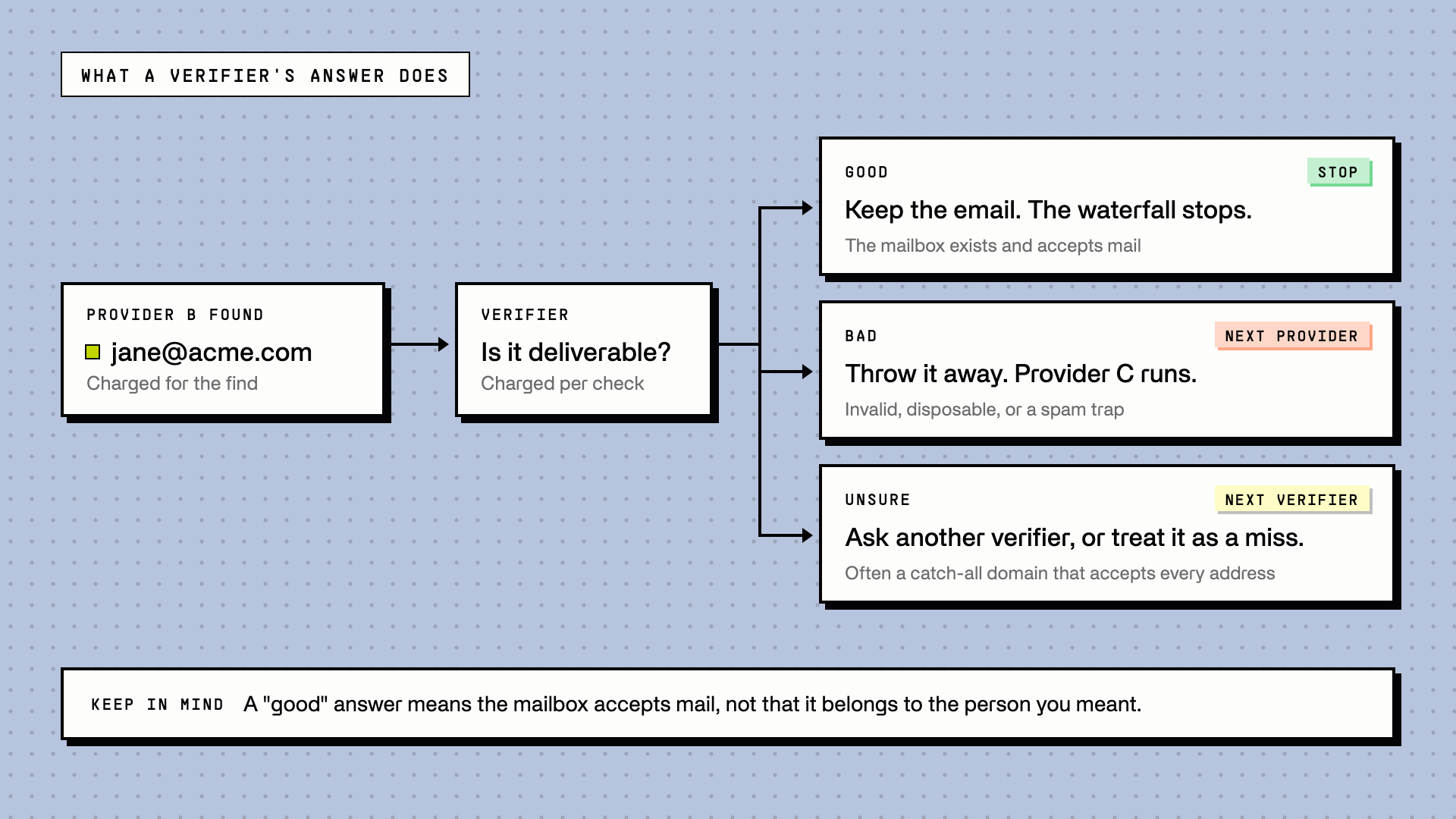
- Good: the mailbox exists and accepts mail. The waterfall stops.
- Bad: the address is invalid, disposable, or a spam trap. It's thrown away, and the next provider runs.
- Unsure: often a "catch-all" domain that accepts every address, so the verifier can't tell. A second verifier can be asked, or the address can be treated as a miss.
Verification has limits worth knowing. It confirms that a mailbox accepts mail, not that the mailbox belongs to the person you meant. Phone numbers get a similar check, usually for whether the number is live and whether it's a mobile line.
5. Stop at the first verified hit, and record who found it
Once a result passes, the waterfall stops for that record. Good tools also record which provider found each result. That record is what lets you tune the order later.
What data you can enrich with a waterfall
| Data point | What you usually search with | Notes |
|---|---|---|
| Work email | Full name and company domain, or a LinkedIn URL | The most common waterfall. Verification is essential. |
| Mobile or direct-dial number | LinkedIn URL | The most expensive data point, with the widest price spread between providers. |
| Personal email | LinkedIn URL | Useful when someone has changed jobs or keeps a low profile at work. |
| LinkedIn profile URL | Email, or name and company | Often the first step, because phone waterfalls need it. |
| Company data (headcount, revenue, industry, tech stack) | Company domain | Usually one strong source per field, with a fallback when it's empty. |
Contact data suits the strict "first hit wins" model best, because an email or a phone number is either found or not. Company data is messier: two sources can both return a headcount and disagree. Teams usually pick one source per field and fall back to a second when the first is empty.
Email waterfall enrichment
Email is the most common waterfall. Finders search by name and company domain, or by LinkedIn URL, and every email they return goes through verification before it counts. Decide up front what to do with catch-all domains, where a verifier can't confirm the address. For a step-by-step build, see how to build a work email enrichment waterfall.
Phone number waterfall enrichment
Phone waterfalls usually search by LinkedIn profile URL, so you often need to find that first. Prices per number found vary much more than for emails, about five-fold between providers in Floqer's phone waterfall, so the order matters most here. Check what kind of number comes back, too: a direct mobile is worth far more than a company switchboard, and some tools check whether a number is live and what type it is before returning it.
Why a waterfall finds more than one provider, and where it stops helping
No provider covers everyone. Coverage varies by country, company size, seniority, and industry. A provider that's strong on US tech companies can be thin on European manufacturers, and the reverse.
That's why the gains can be large when your market is one a single provider covers poorly. Azumuta, a software platform for factories, needed contacts across Europe, the Middle East and Africa. It went from 16% to over 66% enrichment coverage after moving to a waterfall (case study). Structured reported contact accuracy and coverage about 45% higher than it had been getting from ZoomInfo (case study).
The gains have limits:
- Databases overlap. Many providers draw on similar underlying sources, so the fourth or fifth provider adds less than the second.
- Some people can't be found. Small companies, early-career staff, and people with little public footprint are hard for every provider.
- More providers means more to manage. Each one adds cost per hit and another place where data can be wrong.
The only reliable way to know what each provider adds for your market is to test. Run a sample of a few hundred of your own records, look at which provider found each result, and drop the ones that rarely win.
What waterfall enrichment costs
How much a waterfall costs depends less on the tool than on four things:
- Whether you pay per lookup or per hit. Most waterfall tools charge only when a provider returns a result. Check, because paying for every attempt makes a long waterfall expensive.
- The order. Each record stops at the first hit, so a cheap provider placed first saves money on every record it can answer.
- Verification. Each check is a small extra charge, and an email that fails verification has usually already been paid for.
- Repeat lookups. Some tools charge again when you enrich the same record twice. Others serve it from a cache for free.
Cost per result across tools
Prices from each vendor's own pricing page, monthly billing, checked November 18, 2026. Bigger plans lower the price per credit on some of these tools.
| Tool | Price | Work email | Mobile number | You're charged when |
|---|---|---|---|---|
| FullEnrich (Pro) | $0.058 per credit ($29 for 500) | 1 credit ($0.058) | 10 credits ($0.58) | Data is found and passes verification |
| Surfe (Essential to Pro) | Priced per user: $49 to $89 a month | 150 to 1,000 a month per user | 50 to 100 a month per user | Not stated on Surfe's pricing page |
| Apollo | Depends on plan | Typically 1 to 4 credits | Typically 8 to 25 credits | Some vendors charge per lookup even when nothing is found |
| Clay (Launch) | $0.050 per Data Credit, plus Actions | Depends on the provider | Depends on the provider | Each step that returns data, and each validation step |
| ZoomInfo (GTM Studio) | Included | No extra credits | No extra credits | Included for GTM Studio customers |
| Deepline (managed credits) | $0.10 per credit | From $0.013 per result | From $0.065 per result | Depends on the provider: some only on a match, some per attempt |
| Floqer (any plan) | $0.0135 per credit | 1 credit at most ($0.0135), plus 0.1 to 1 credit per verification check | 5 to 25 credits ($0.068 to $0.338) | A provider returns a result |
Some tools charge a platform fee on top of usage. Deepline's Solo plan is $0 a month plus usage, and its Team plan is $395 a month plus usage, with $200 of usage included. For Clay, the provider you pick sets the price: our Clay pricing guide lists the per-step rates.
A worked example: why order matters
Floqer's credit costs show how wide the spread between providers can be. A Floqer credit costs $0.0135 on every plan.
Work emails. Each email finder costs at most 1 credit when it returns an email, and nothing when it doesn't. Each verification check adds 0.1 to 1 credit, depending on the verifier. A typical verified work email comes to about 1.5 credits, or 2 cents.
Mobile numbers. Prices per number found vary five-fold:
| Provider in Floqer's phone waterfall | Credits per number found | Cost per number |
|---|---|---|
| Floqer | 5 | $0.068 |
| Prospeo | 6 | $0.081 |
| Wiza | 7 | $0.095 |
| LeadMagic | 8 | $0.108 |
| Datagma | 23 | $0.311 |
| Forager | 25 | $0.338 |
That spread is why order matters. Suppose you enrich 1,000 contacts, and the four cheaper providers find 400 numbers between them at an average of 6.5 credits, while Datagma and Forager find 100 more that the others missed at an average of 24 credits. That's 2,600 plus 2,400 credits: 5,000 credits, or $67.50 for 500 numbers. Every number an expensive provider finds that a cheaper one could have found costs about four times as much, so the expensive providers belong at the end.
Waterfall enrichment in Apollo, Clay and ZoomInfo
All three now have a waterfall of their own, and they work differently. Everything below comes from each company's own site and documentation, checked November 18, 2026.
| Apollo | Clay | ZoomInfo | |
|---|---|---|---|
| Where it runs | After Apollo's own data | As a column in a Clay table | In GTM Studio, after ZoomInfo's own data |
| Who picks the providers and order | Your Apollo admin | You | ZoomInfo |
| Sequence or parallel | Sequence | Sequence | Parallel |
| Verification | Validation partners | Validation steps in the waterfall | Keeps the highest-confidence result |
| Extra cost | Email typically 1 to 4 credits, phone 8 to 25 | Data Credits and an Action for each step that returns data | None for GTM Studio customers |
Waterfall enrichment in Apollo
Apollo's waterfall fills each record with Apollo's own data first, then lets "20+ partners fill in the rest." It covers emails and phone numbers. An Apollo admin chooses which partner sources run and in what order, and you can also bring your own data vendor. Apollo runs each email through "data validation partners" before it reaches your team.
It costs more than a standard Apollo lookup. A normal enrichment uses 1 credit for an email, plus 8 credits if a mobile number comes back. Apollo's API pricing page says email waterfalls "typically" use 1 to 4 credits and phone waterfalls 8 to 25, that "some configurations may result in 45+ credits," and that "some vendors consume credits per lookup even when no data is found." Apollo also switches the waterfall off for CSV uploads over 50,000 rows.
Waterfall enrichment in Clay
Clay offers pre-built waterfalls from "Add enrichment," or you can build your own from "Add column" and save it as a template. You can reorder, add, and delete providers, and switch individual steps off. Clay's own pages put the number of providers anywhere from 50 to over 200.
Since March 11, 2026, Clay bills two meters. According to Clay's FAQ:
- Each step that returns data uses Data Credits and an Action.
- Each validation step does too, though Clay says some validators are free under the new pricing.
- Once validated data comes back, the rest of the waterfall doesn't run.
- If the whole waterfall finds nothing, nothing is charged.
- A step on your own API key uses an Action but no Data Credits.
Our Clay pricing guide covers both meters in detail.
Waterfall enrichment in ZoomInfo
ZoomInfo launched waterfall enrichment in February 2026 as part of GTM Studio, which its product page describes as being in early access. It only runs when ZoomInfo doesn't already have an email or mobile number for the contact. Rather than trying vendors one at a time, it queries them in parallel, "25+ third-party vendors" according to ZoomInfo's blog and "40+ data providers" according to its product page, and keeps "the highest-confidence alternative" with the vendor credited. You don't rank the vendors yourself.
For GTM Studio customers it comes "at no additional cost, with no credit consumption." ZoomInfo's pages don't say whether you can choose or exclude vendors, or whether it's available through an API.
Waterfall enrichment tools compared: four types
Most tools that offer waterfall enrichment fall into four groups.
| Type | Examples | Who picks the providers | Best for |
|---|---|---|---|
| Built into a prospecting tool or database | Apollo, ZoomInfo, Surfe | Apollo: your admin. ZoomInfo and Surfe: the vendor. | Teams already using that tool who want its gaps filled |
| Waterfall as a service | FullEnrich | The vendor, from 20+ sources | Enriching lists without building anything |
| Workflow platforms | Clay, Floqer, Deepline | You | Teams that want waterfalls inside bigger workflows, with AI research, scoring, and CRM sync. Deepline is built for AI agents working from the terminal. |
| Build your own | Your code and each provider's API | You | Engineering teams with unusual needs and time to maintain it |
A few things to check whichever group you look at:
- Can you see which provider found each result? Without it, you can't tune the order.
- Are you charged for misses? Per-hit pricing makes long waterfalls safe to run. Per-lookup pricing doesn't.
- Can you use your own keys? If you already pay for a provider, you shouldn't pay for it twice.
- Where do results go? A waterfall that ends in a CSV download leaves the CRM work to you.
Where Floqer fits
Floqer is a workflow platform, so it sits in the third group: you pick the providers and the order for each data point, and the waterfall runs as one step in a larger workflow.
What Floqer has:
- An email waterfall with verification built in: 10 email finders on Floqer credits by default, plus 4 more you can run on your own key, checked by a chain of up to 7 verifiers. An email only comes back once a verifier confirms it.
- Waterfalls for mobile numbers, personal emails, and LinkedIn URLs.
- Pay per hit: a provider that finds nothing isn't charged. An email finder costs at most 1 credit, and a phone number 5 to 25 credits depending on the provider.
- Your own keys, per provider, so a provider you already pay for doesn't spend Floqer credits.
- One credit balance at $0.0135 per credit on every plan, and repeat lookups served from Floqer's cache for free.
- Results written to Salesforce or HubSpot without creating duplicates, plus the API and MCP server for running waterfalls from code or an AI agent.
What to weigh:
- If you already pay for Apollo or ZoomInfo and only need to fill some gaps, their built-in waterfalls may be enough. ZoomInfo's costs nothing extra for GTM Studio customers.
- Phone and personal email waterfalls in Floqer search by LinkedIn URL, so you need a profile URL first. Floqer has a waterfall for finding that too, but it's an extra step.
- A found email is paid for even if verification then rejects it. Clay bills the same way. FullEnrich charges only for data that passes verification.
- If your team works mostly through AI agents in the terminal, Deepline is built around that. Floqer supports it through its API and MCP server, but its main interface is the app.
- Some providers, such as FullEnrich, run only on your own key in Floqer.
You can try it on the free plan, which includes 100 credits, or see the plans on the pricing page. The waterfall enrichment page shows the product.
Waterfall enrichment API and MCP
Waterfalls don't have to run inside a spreadsheet-style app. If you're enriching from your own product, a data warehouse, or an AI agent, you need one that runs over an API.
What to look for:
- Configurable order over the API. You should be able to set which providers run, and in what order, without opening the app.
- One call per record, not one per provider. The tool should run the whole chain and return the winner, along with which provider found it.
- Your own keys. If you already pay for a provider, you should be able to run it on your own key instead of the tool's credits.
In Floqer, the provider list is an ordinary action setting. A request like this sets the finders, the verifiers, and which one runs on your own key:
{
  "inputs": {
    "full_name": "{{input.full_name}}",
    "company_domain": "{{input.company_domain}}",
    "email_finders": ["hunter", "prospeo", "leadmagic"],
    "email_verifiers": [
      "MillionVerifier",
      { "name": "ZeroBounce", "use_own_key": true },
      "NeverBounce"
    ]
  }
}
The same workflows can be driven from Claude, Claude Code, ChatGPT, Cursor, and other AI tools through Floqer's MCP server, so an agent can build and run a waterfall from a plain-language request.
Other tools take different approaches:
- Deepline calls itself an "agent-callable GTM data layer." It's driven from a command line, an API, or an MCP server, and its waterfalls query providers "in configurable sequence." Its pricing docs note that "earlier calls can be billable, including valid misses," so check how each provider in the chain bills.
- Apollo's API can run its waterfall. You set
run_waterfall_emailorrun_waterfall_phoneon its people enrichment endpoints, and the results arrive later at a webhook URL you provide. Apollo lists API access on its Custom plans. - Surfe lists its waterfall enrichment API on its Enterprise plan.
How to set up your first waterfall
- Clean your inputs. Make sure company domains are right and LinkedIn URLs are standard profile links (linkedin.com/in/…), not Sales Navigator links.
- Pick three to five providers per data point. Start with the cheaper ones first.
- Add verification for emails, and decide what to do with catch-all addresses before you run anything.
- Test on a few hundred records. Track which provider found each result and what it cost.
- Reorder and trim. Move up providers that win often for your market, and drop ones that rarely find anything.
- Avoid paying twice. Use caching, or enrich only the records that are actually missing data.
For a click-by-click build of an email waterfall, see how to build a work email enrichment waterfall.
Sources and method
Every fact about another company comes from that company's own site or documentation, checked November 18, 2026. Where a company's pages disagree with each other, such as the number of providers, we give the range.
- Apollo: waterfall product page, API pricing, people enrichment reference, waterfall API guide, and Apollo's guide to credits for large batches.
- Clay: building a data waterfall, waterfall enrichment, billing FAQ, Actions and Data Credits, and pricing.
- ZoomInfo: launch announcement, product page, and ZoomInfo's guide to waterfall tools.
- FullEnrich: pricing.
- Surfe: pricing and waterfall enrichment.
- Deepline: pricing, pricing docs, and product overview.
- Floqer: our credits documentation and the per-provider costs in Floqer's waterfall actions.
FAQ
What is waterfall enrichment in sales? It's a way to find contact details, mostly work emails and phone numbers, by asking several data providers in order until one returns a verified result. Sales teams use it to get more coverage on outbound lists and inbound leads than any single data provider gives them.
What is the difference between data enrichment and waterfall enrichment? Data enrichment means adding missing information to a record. Waterfall enrichment is one way of doing it: instead of relying on a single provider, it tries several in sequence and stops at the first good result.
What is waterfall enrichment in Apollo? It's Apollo's feature for filling gaps in its own data. When Apollo doesn't have an email or phone number, it tries 20+ partner providers in an order your admin sets, and validates emails before returning them. It typically costs 1 to 4 credits per email and 8 to 25 per phone number, more than a standard Apollo lookup.
How does waterfall enrichment work in Clay? You add a pre-built waterfall or build your own as a column in a Clay table, then reorder or remove providers. Each step that returns data uses Data Credits and an Action, and the waterfall stops once a validated result comes back. If no provider finds anything, nothing is charged.
Does ZoomInfo have waterfall enrichment? Yes. Since February 2026, ZoomInfo's GTM Studio checks 25+ outside vendors in parallel when ZoomInfo lacks an email or mobile number, and keeps the highest-confidence result. It costs GTM Studio customers nothing extra, but ZoomInfo picks the vendors, not you.
What are the best waterfall enrichment tools? It depends on where you already work. If you use Apollo, ZoomInfo or Surfe, their built-in waterfalls fill gaps in their own data. FullEnrich suits enriching lists without building anything. Clay, Floqer and Deepline suit teams that want to choose the providers and run waterfalls inside bigger workflows, with Deepline aimed at AI agents working from the terminal. Compare the cost per result, and whether misses are charged, before you pick.
Is there a waterfall enrichment API? Yes. Floqer's API lets you set which providers run and in what order, and its MCP server lets AI agents run waterfalls too. Apollo's API can run its waterfall on its Custom plans, Deepline is built around a command line, API and MCP server, and Surfe lists its waterfall API on its Enterprise plan.
How many providers should a waterfall have? Three to five per data point is a good start. Beyond that, providers overlap and each extra one adds less. Test on a few hundred of your own records, see which providers actually win, and drop the ones that rarely do.
Does waterfall enrichment cost more than using one provider? Not usually per result, if the tool charges only when a provider finds something. You pay for the result you get, plus verification. Costs climb when expensive providers sit early in the order, when a tool charges for lookups that find nothing, or when the same records get enriched twice.
What's the cheapest way to run waterfall enrichment? Put the cheapest providers first, use a tool that charges per hit rather than per lookup, verify emails before you use them, and don't pay twice for records you've already enriched. The per-result prices in the table above vary several times over between tools, especially for phone numbers.
Is waterfall enrichment GDPR compliant? The method itself is neutral. Compliance depends on how each provider collects its data and on your own lawful basis for contacting people. Check each provider's data processing agreement, and honor opt-outs across every source in the waterfall. This isn't legal advice.