Sync with Google Ads Platform, Create Shortcuts, Check Credits and Manage Members via MCP and APIs
Until today getting your leads into a Google Ads audience meant exporting a CSV from Floqer and uploading it to Google Ads. Your workflow can now add and remove them in Google Ads directly. This release also lets you export workflows, create Shortcuts, check your credit balance and invite teammates headlessly from MCP, APIs, Flo in Slack or any agentic platform.
Platform Features
1Sync your leads with your Google Ads audience
Your best leads are already in Floqer. To target them with ads you had to export a CSV and upload it to Google Ads by hand. Every time the list changed you had to do it all over again. We added a new integration for Google Ads that lets you push each row into a Customer Match list straight from your workflow.
This is how you can sync to Google Ads:
-

Go to Connections, select Google Ads and click Connect to Google Ads. Then sign into your Google account connected to Google Ads.
-

Add the Google Ads Sync action to your workflow.
-
Set Operation to add or remove.
-
Select your Google Ads account and a Customer Match list or click Create a new list. Add your manager account ID if you use one.
-
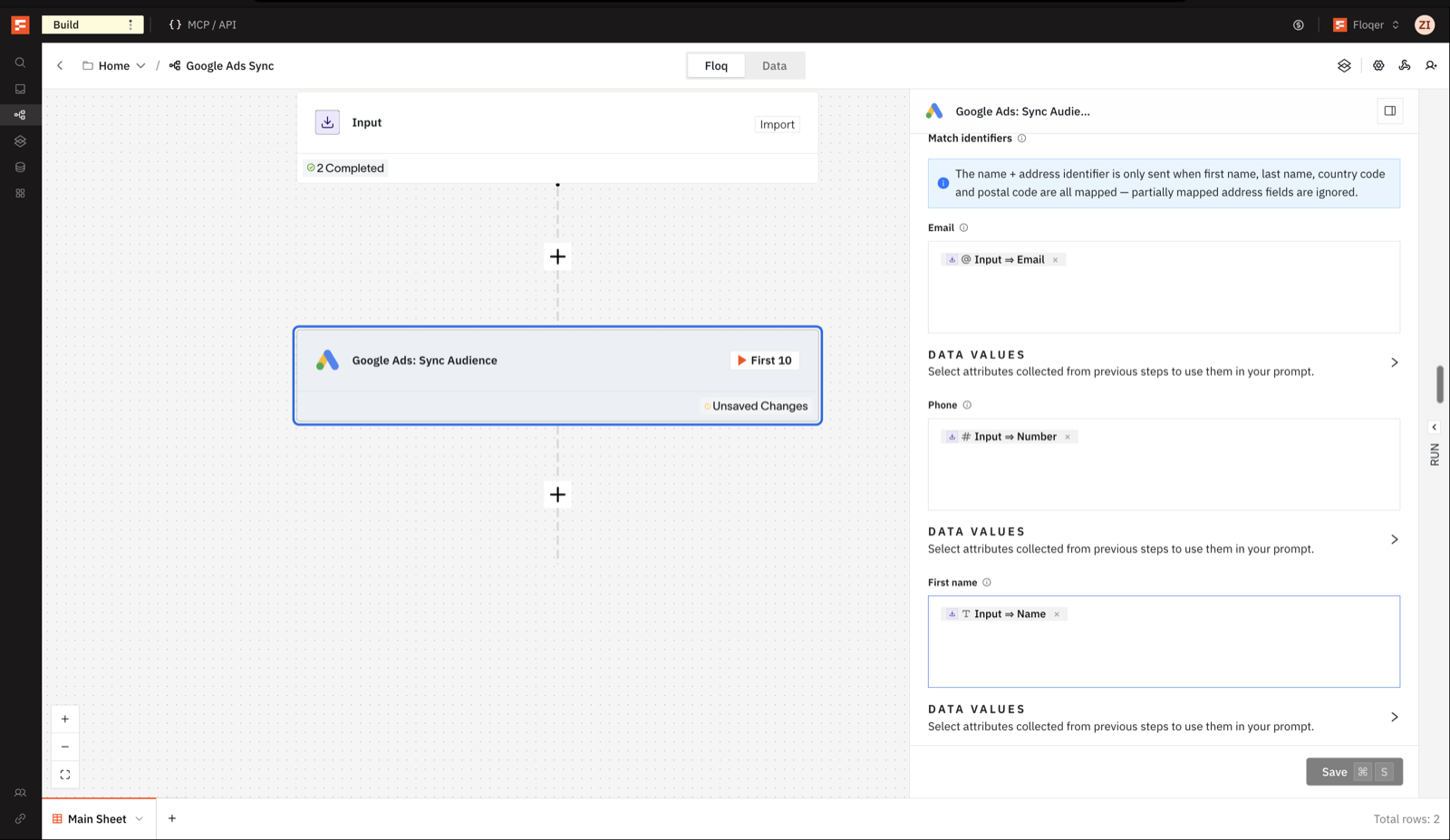
Map the match identifiers. Use Email or Phone with the country code, or use first name, last name, country code and postal code together. Floqer formats and hashes them for you.
-
Set Consent: ad user data and Consent: ad personalization. Google's EU user consent policy requires both for people in the European Economic Area and skips anyone uploaded without consent.
The action costs 0 Floqer credits.
Note
Google can take up to 48 hours to match contacts. A Status of accepted means Google received the row. The audience size in Google Ads updates once Google has matched it.
-
Agentic Building
5Create and publish Shortcuts headlessly
You build a workflow and want your team to use it as a Shortcut. Now you can prompt Floqer Agent to turn any workflow into a Shortcut and let your team run it. The same works headlessly from MCP, APIs, Flo in Slack or any agentic platform. This enables you to take these actions:
- Create a Shortcut. Tell your agent to turn the workflow into a Shortcut and give it a name and the columns to return. Your team can run it right away.
- Publish an update. Changed the workflow? Ask your agent to publish the Shortcut again and your team gets the new version. Renaming it or changing its description or icon needs no republish.
Note
Editing the workflow alone does not update its Shortcut. Older Shortcuts need one republish in the Floqer platform before they can be updated headlessly.
See Create Shortcut and Update Shortcut in the API reference.
Export your workflows headlessly using Floqer Agent
Until now the list Flo built for you stayed in the Floqer platform and you had to go there to export it yourself. Now you can ask Flo to export the workflow and it sends you the CSV in the same conversation.
- In Slack ask Flo to export workflow rows or a Shortcut batch and the file lands in the thread. Files over 100 MB come as a download link that expires after 15 minutes.
- In Floqer Agent the export shows up as a download card in the conversation.
Note
Slack access requires Floqer Agent enabled for your organization. Contact the Floqer team for access.
Check credit balance and usage headlessly
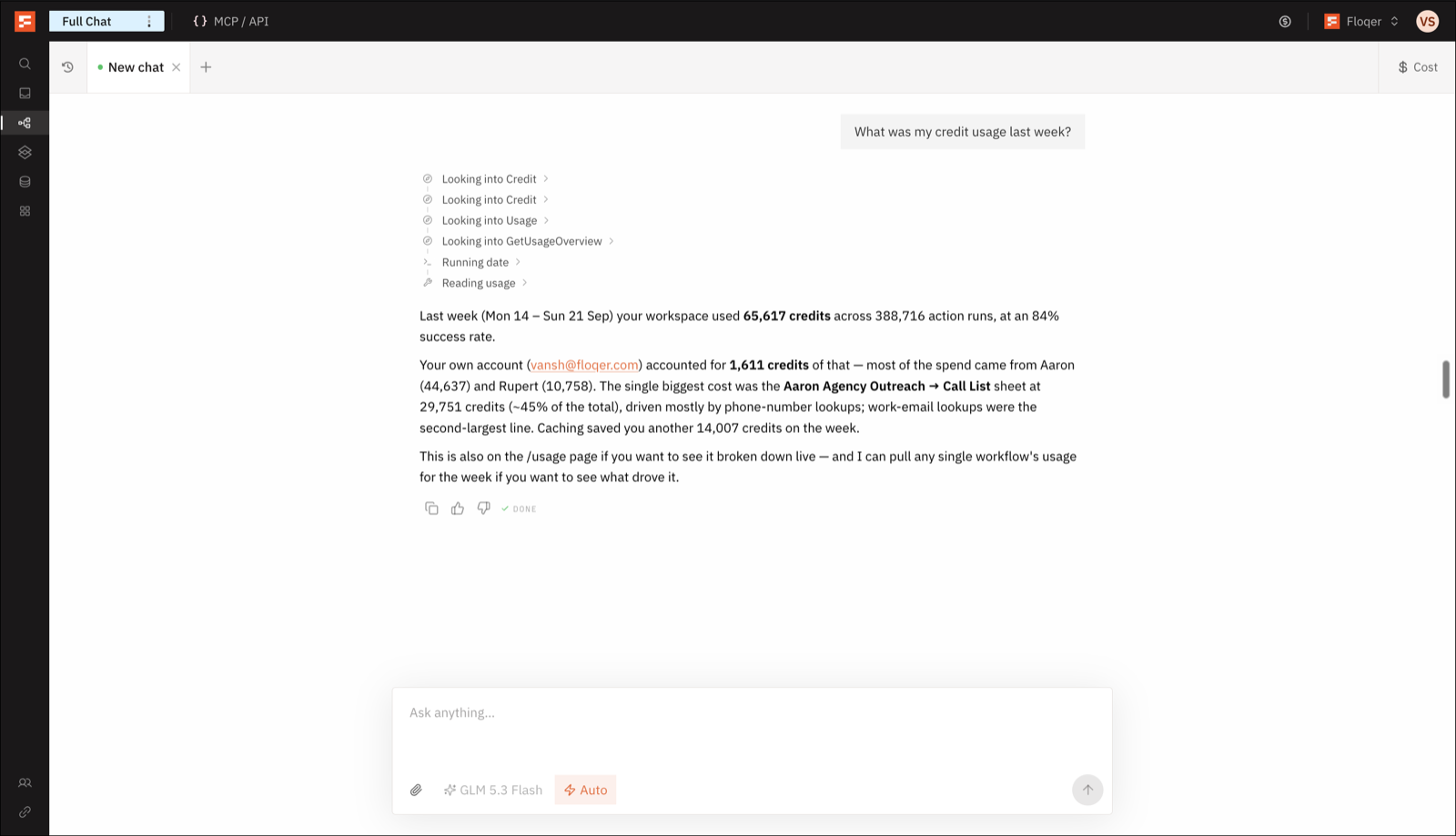
You want to check how many credits are left before running a big enrichment. Now you can ask Floqer Agent for your balance and where the credits went.
- "How many credits do we have left?" gives the organization's balance. Member quotas still apply.
- "What did we spend last week?" gives daily totals and a breakdown by workflow and Source for any date range.
- Admins see the whole organization and everyone else sees their own usage. The balance is always organization-wide.
Usage takes a few seconds to catch up with recent runs.
See Get Credit Balance and Get Usage Overview in the API reference.
Invite and remove teammates headlessly
Someone joins the team or someone leaves and you are already in Slack or your agent. Admins can now handle both from there.
- "Invite this person as a member." The invitation reserves a seat and stays pending until they accept.
- "Remove this person from the organization." This cancels a pending invitation or removes an active member. You cannot remove yourself or the last admin.
Note
Removing a member revokes their API keys and shared connections. Their Sources stop importing but their workflows keep running and spending credits. SSO-managed members are removed in your identity provider instead.
See Add Member and Remove Member in the API reference.
Stop a Floqer Agent run

Now you can stop an ongoing Floqer Agent message without having to wait for its completion. Press Stop and your question and everything it already answered stay in the conversation.
Note
A tool call already in progress may finish first. Stopping does not undo completed actions or refund credits already spent.
Data & Integrations
1LinkedIn posts can be scraped at per-post pricing
Until now LinkedIn: Scrape Posts charged you per page even when you only asked for one post. You now pay per post and can pull up to 100 posts from a person or a company page. This is only possible with the Gem provider.
- Choose up to 100 posts. The default is 15.
- 0.5 credits per post with a 2-credit minimum. 15 posts cost 7.5 credits. If the profile has no posts or Gem cannot find it, you are charged the 2-credit minimum.
Improvements
2Higher Floqer Agent credit allowance on self-serve plans
Floqer Agent is our frontier agent that builds and runs workflows for you. We saw increasing demand and requests from users building complex workflows with it, so we raised its credit allowance on self-serve plans.
New variable: time a row was created at
Now you can refer to the time a row was added in your workflow as a variable. Pick Created at from the variable picker and use it in formulas, action inputs and run or path conditions. For example you can run a step only on leads added this week.
Bug Fixes
7-
Improved success rates of Floqer Nova.
-
Renamed Split Paths keep their names after a reload.
-
Pressing Enter while renaming an action no longer closes its settings.
-
Fixed Google mailbox connectivity delays.
-
Floqer Agent no longer causes abrupt stops.
-
Improved the accuracy of Floqer Agent's replies.
-
Flo can now read user names and IDs and identify the person in a Slack thread.