Run From Row X to Row Y, New Action to Add Prospects to Nooks Sequences and Claude Opus 5.5
Until today, to run a subset of rows you had to select them manually. Now you can enter a range, from row X to row Y, and run just those. This release also adds a new action to add prospects to Nooks sequences, promo codes at signup, Claude Opus 5.5 and Manual Dedupe on tables with millions of rows.
Platform Features
2Run From Row X to Row Y
Until today, to run a subset of rows you would have to select them manually. Now you can enter the range you want to run, from row X to row Y, and run them.
There are two ways to run this.
Option 1
-

Open the Run menu at the top of the table and pick Rows X to Y.
-
Type the first and last row and click Run. Every action runs for those rows.
Option 2
-
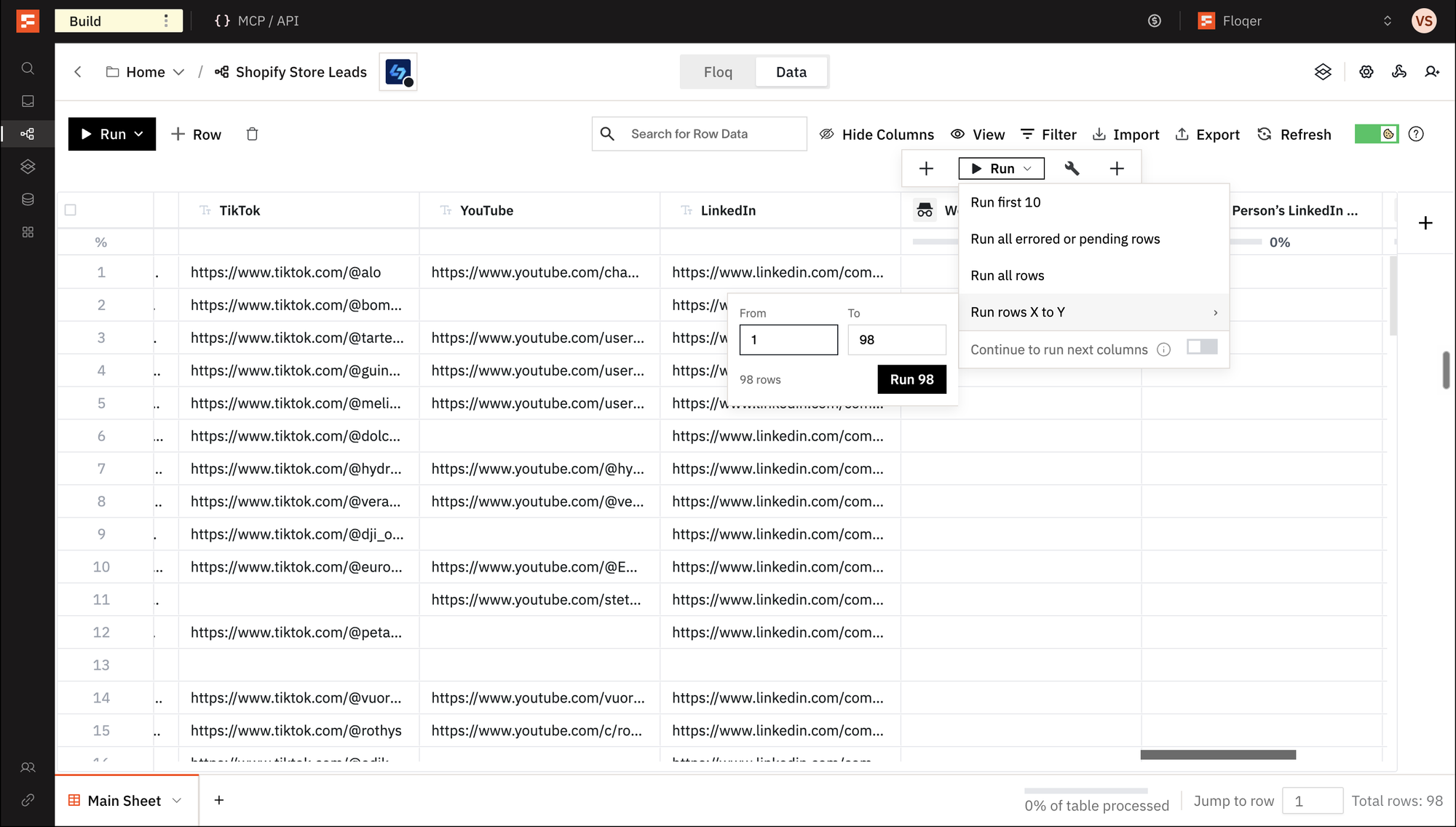
Open the column's Run menu and pick Run rows X to Y.
-
Type the first and last row and click Run. Only that action runs for those rows. Turn on Continue to run next columns to also run the actions after it.
You can also run a range headlessly from MCP, APIs or any agentic platform.
API reference: Run Rows, Run Action
Note
The row numbers are the ones you see in the table. With a filter, sort or search on, rows 5 to 12 are the eight rows shown as 5 to 12, not rows 5 to 12 of the whole table. A range can cover up to 10,000 rows at once.
-
Redeem a Promo Code at Signup

Until today, there was no way to redeem a promo code at signup. Now you can. When you create a new organization, click Add promo code under the password fields and enter the code you were given. The credits show up in your credit balance.
Note
A code that does not match anything changes nothing. People joining an existing organization by invitation do not see the field.
Agentic Building
2Manage Workflow and Shortcut Access Headlessly
Until today, sharing a workflow or a Shortcut with a teammate meant opening the platform. Now you can ask your agent to share one, take the access away or check who has it. You can share with anyone in your organization. A Shortcut can also be opened up to the whole organization or set back to private.
You can do this headlessly from MCP, APIs or any agentic platform.
API reference: Share Workflow, Share Shortcut, Update Shortcut
Smarter Shortcut Search for Agents
Agents have more context on which Shortcut to use. Until today, an agent could find a Shortcut only by its name. Search now matches the description, inputs and outputs as well, with name matches first.
API reference: List Shortcuts
Data & Integrations
3New Action: Add Prospects to Nooks Sequences
Nooks is an AI dialer that sales teams use to call through their lists. A lot of our users run their calling sequences in Nooks, so we built a native Nooks integration. Now you can add Nooks: Enroll Prospect in Sequence to a workflow.
Here is how you set it up:
-
Go to Connections, select Nooks and paste your Nooks API key.
-
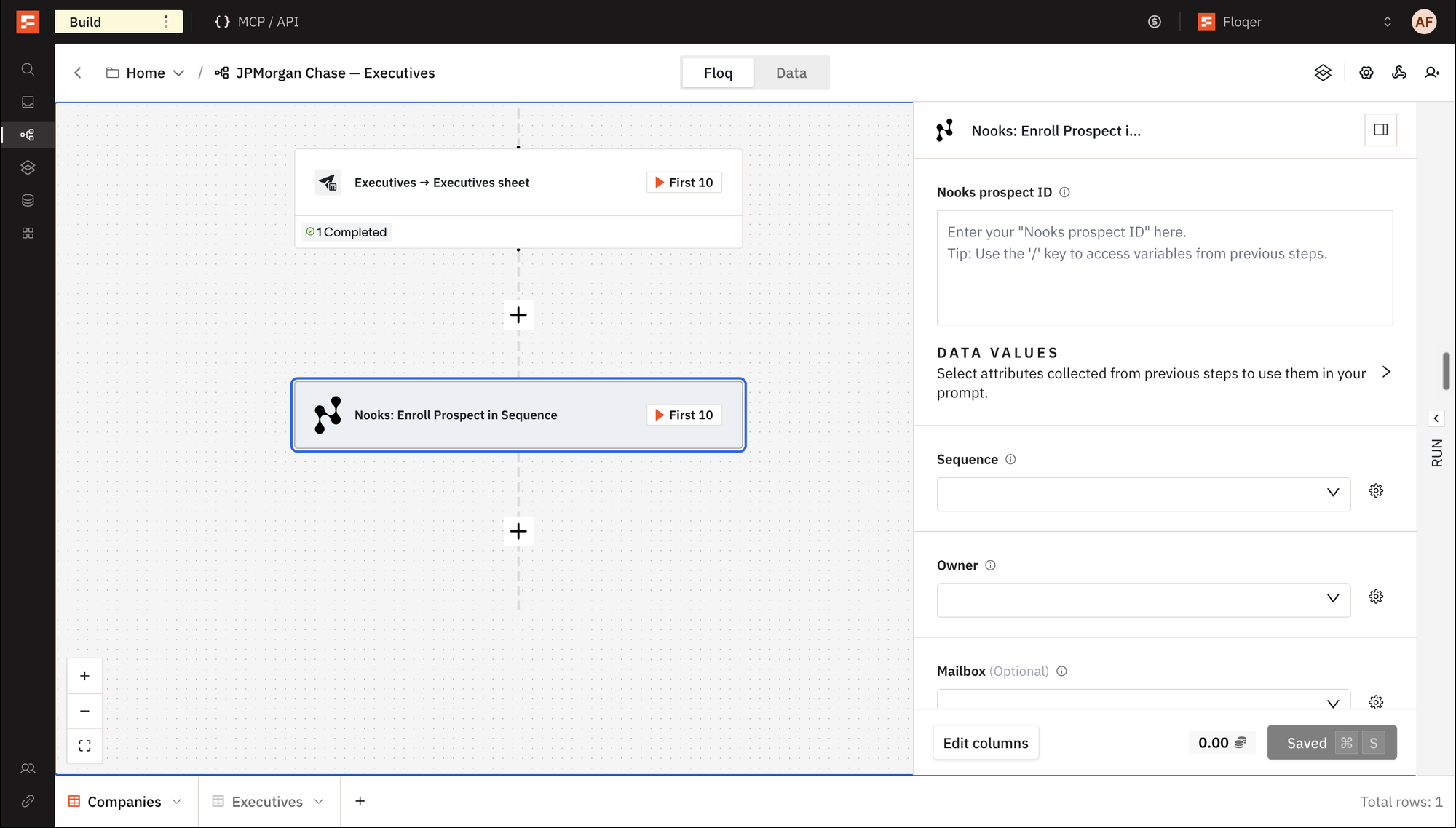
Add Nooks: Enroll Prospect in Sequence to your workflow and map the Nooks prospect ID.
-
Pick the Sequence and the Owner. You can also map a column with the ID or exact name, or the owner's email.
-
Mailbox, State and Scheduled at are optional.
Each row gets back the enrollment ID, its state and the step the prospect starts on. The action uses no Floqer credits.
You can also add it headlessly from MCP, APIs or any agentic platform.
Note
The prospect has to exist in Nooks already. A prospect who is already in the sequence fails the row with the reason Nooks gives. A sequence or user you just created in Nooks can take up to 30 minutes to work in a run.
-
New Phone Number Provider for India: Weekday
We have added Weekday (India) to the Find Verified Phone Number using LinkedIn URL waterfall. It finds more phone numbers for people in India. It costs 25 credits.
Claude Opus 5.5 Available
You can now pick Claude Opus 5.5 as the model in AI Generate Content. It costs 10 credits.
Improvements
3Filter Sales Nav Employees by Location
Until today, Region in Sales Nav: Find Employees at Company was a free text field. Sales Navigator ignored any region it did not know. Now Location and Exclude Location replace Region and Exclude Region. Start typing a city, state or metro. Pick it from the suggestions. The search then always uses a location Sales Navigator knows.

Note
Region and Exclude Region are outdated. A row that still has a value in either fails with an error. Clear them and use Location instead.
Improved Filters and Results in AI Ark: Find Employees at Company
AI Ark: Find Employees at Company has new filters and a lower price. Saved actions keep working. The old input and output names still work in the API.
New
- Started Current Role From and Started Current Role To filter by when people started their current role. Type a date or map a column. When they are set, Years In Current Position is ignored.
- Years In Current Position gains Less than 3 months, 3 to 6 months and 6 to 12 months.
Renamed
Inputs
Previous field name New field name Company Name Company Identifier Number of People Number of Employees Exclude Current Titles Exclude Job Titles Past Titles Past Job Titles Function / Department Departments & Functions Profile Language Languages Industry Company Industries Use Personal API key AI Ark API key Advanced: raw AI Ark filters (JSON) Raw AI Ark Filters (JSON) Outputs
Previous field name New field name People List of Employees No. of People No. of Employees Country Name Country Removed
- Company Identifier takes the company's domain or LinkedIn URL only. A company name no longer matches.
- New actions no longer get the AI Ark ID output. Saved actions keep it.
Each person returned costs 0.2 credits instead of 0.5. On your own AI Ark key it stays 0.5 AI Ark credits per person, plus 0.1 for the company check when the company exists but nobody matches.
Note
Lists of titles, departments and languages are separated with semicolons. Commas still work when no value contains one.
Improved Resilience for Manual Dedupe
We have increased the stability and speed of Manual Dedupe on large tables. It can now process millions of rows.
Bug Fixes
2-
Allegrow: Email Verification no longer gives up on verifications that take longer. It waits and returns the real result, in the action and in the Find Work Email waterfall.
-
HubSpot list syncs now include newly added objects in HubSpot segments.