Introducing GPT 6 Family, New Way to Connect ZoomInfo With an OAuth App, Reorder Actions From the Data View and Flo Now Reads Images
OpenAI's GPT 6 family is now in Floqer. You can pick GPT 6 Astra, GPT 6.1 Sol or GPT 6 Luna as your model in your workflows. This release also lets you connect ZoomInfo with an OAuth App, reorder actions from the Data view and send images to Flo. It also adds BetterEnrich and Anymail Finder in Find Work Email, GLM 5.3, an improved export experience and credits by source on the Usage page.
Data & Integrations
4Introducing the GPT 6 Family in Floqer
OpenAI's GPT 6 models are now in Floqer. You can pick GPT 6 Astra, GPT 6.1 Sol or GPT 6 Luna as the model in AI Generate Content. Each one is built for a different kind of work.
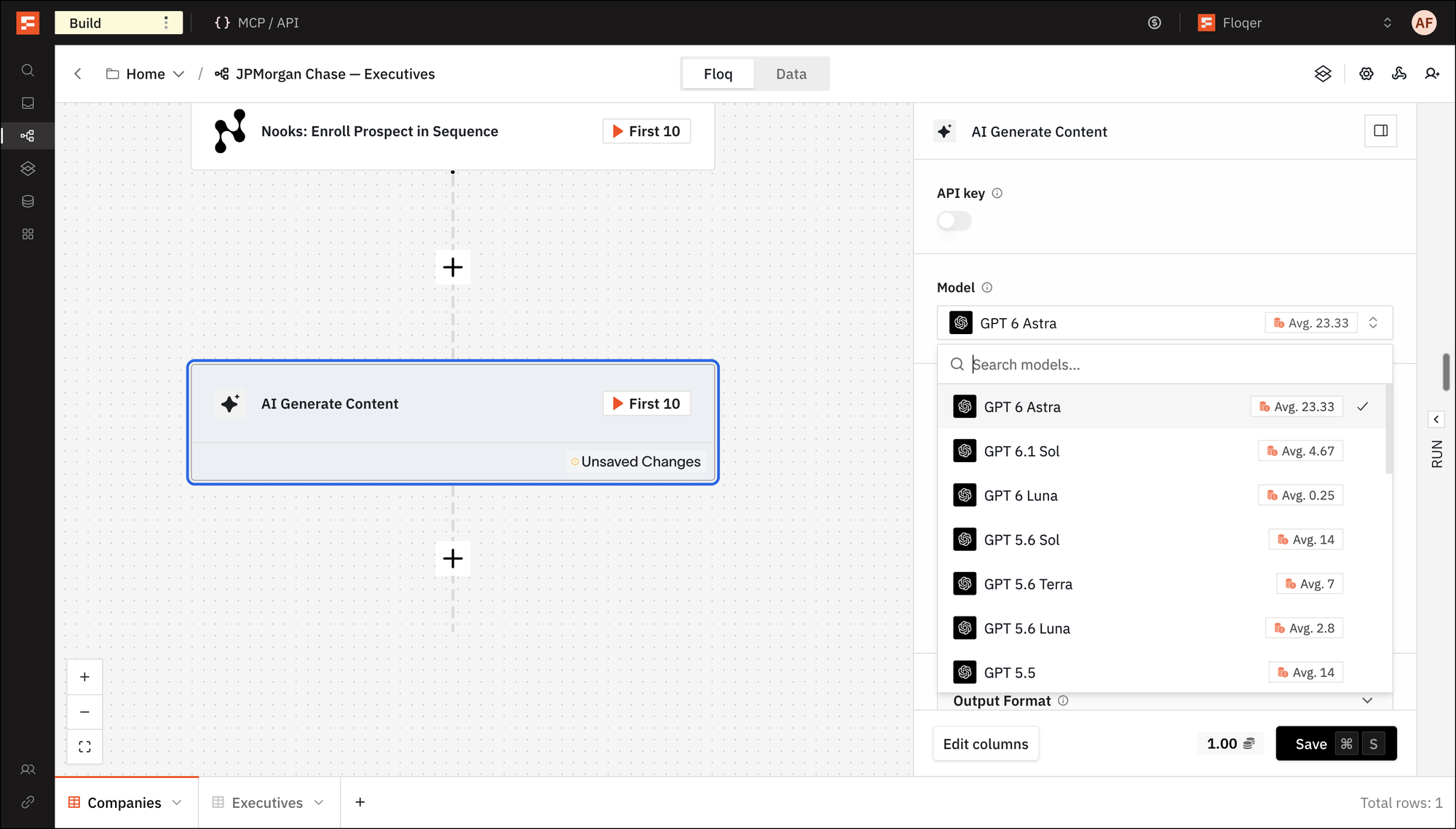
Model When to use Credit Cost GPT 6 Astra OpenAI's most intelligent model. It is best for the hardest reasoning, analysis and writing. It makes the fewest factual mistakes of the three. 23.33 GPT 6.1 Sol Near Astra quality at a fifth of the price. It is best for complex professional work. 4.67 GPT 6 Luna The fastest and cheapest of the three. It is best for focused, high-volume tasks. It makes fewer factual mistakes than GPT 5.6 Luna. 0.25 New Way to Connect ZoomInfo: OAuth App

Until today, you could only connect ZoomInfo with a Private Key from the Enterprise API. ZoomInfo is moving customers off that API. Now you can connect with an OAuth App from the ZoomInfo Developer Portal.
Here is how you connect it:
- In ZoomInfo, create an app in the Developer Portal with the Client Credentials Flow and copy its Client ID and Client Secret. See ZoomInfo for the steps.
- In Floqer, go to Connections, select ZoomInfo and keep the OAuth App tab. Paste the Client ID and Client Secret and click Connect to ZoomInfo.
- Turn on Enable for Org to share the connection with your team.
Note
OAuth App works on ZoomInfo plans with API access: Enterprise API, Copilot or a GTM.ai self-serve plan. Private Key connections keep working.
New Providers in Find Work Email: BetterEnrich and Anymail Finder
We added BetterEnrich and Anymail Finder to the Find Work Email waterfall for better coverage.
BetterEnrich: Each lookup checks more than 20 data providers for the person. It costs 4 credits.
Anymail Finder: Every email it returns is verified with the recipient's mail server. It costs 3 credits.
BetterEnrich also joins the Find LinkedIn URL using Email waterfall. It costs 2 credits and works with work emails.
New Open Weight Model in AI Generate Content: GLM 5.3
GLM 5.3 is Z.ai's new flagship model, built for complex, multi-step work and long-running agent tasks. You can now pick it as the model in AI Generate Content. It costs 2 credits.
Platform Features
1Reorder Actions From the Data View

Until today, moving an action to a different place in a workflow meant opening the Floq view and rewiring it there. Now you can drag a column header left or right in the Data view. The action moves to that spot in the workflow and the new order is saved.
Here is how it works:
-
Hold a column header and drag it left or right. A marker shows where it will land.
-
Drop it. The action now runs right after the column on its left.
-
Floqer saves the new order straight away. The action keeps its settings and mappings.
A moved action can end up using a column that now runs after it. Floqer keeps the move and names the actions to check, so you can fix the mapping before the next run.
Note
Input columns stay first and pinned columns cannot be dragged. A move across a Filter, Split Path or subfloq is still done in the Floq view. With Auto-publish off, the new order shows once you publish the workflow.
-
Agentic Building
1Flo Now Reads Images

Until today, Flo could read CSV and Excel files but not images. Now you can send Flo a screenshot or any other image and ask about it. Flo reads the image along with your message and uses it in its answer.
There are two ways to send one.
Option 1
-
Click the paperclip in the Flo panel and pick the image, or drop or paste it into the message box.
-
Type what you want Flo to do and send. The image shows as a thumbnail in your message.
Option 2
- In Slack, attach the image to a message that mentions Flo, or to a reply in a thread Flo is already in.
- Flo answers in the thread. A file Flo cannot read gets a reply that names it and says why.
Note
Flo takes PNG, JPEG, WebP and GIF files up to 5 MB each and four per message. A model marked Text only in the model picker cannot take images. Flo keeps an image in view for three turns, so send it again if you need it later.
-
Improvements
2Improved Export Experience

Until today, it was easy to miss when an export finished. Now you can see the progress of your export under the toolbar. When the file is ready, click Download. You can also cancel an export and start it again.
Note
You cannot delete rows while an export runs, so the file has every row you asked for.
Sources Have Their Own Panel on the Usage Page
Until today, credits spent by a Source showed up under workflows on the Usage page. They showed an ID instead of a name. Now the Overview has a Top sources by credits panel next to Top workflows by credits, with every Source by name. The Users tab shows each person's top workflow or Source.
Bug Fixes
3-
Web Pilot error rate has diminished and speed has increased.
-
Improved durability of status bars at the top of data tables.
-
LinkedIn URLs with an apostrophe, emoji or other special characters in the profile name are not rejected anymore.